This is best Fabric, Power BI, SQL and AI community event. How do we know? The last event sold out! Save €200 with code FABCMTY200.
Register nowThe Fabric community is upgrading! Read all of the details including the timeline and what you can expect. Learn more
Hi all,
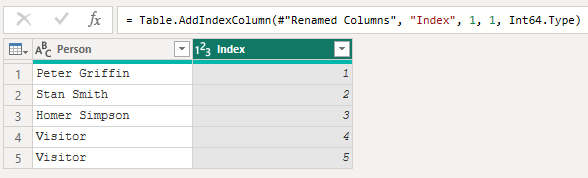
Can anyone please tell me how I can add an index colum but only for certain rows? So for example in the data below
I would like rows 4 and 5 to be 1 and 2 respectively.
Thanks
Solved! Go to Solution.
Hi @davidgray42, check this.
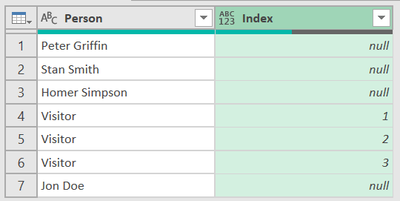
Result:
let
Source = Table.FromRows(Json.Document(Binary.Decompress(Binary.FromText("i45WCkgtSS1ScC/KTEvLzFOK1YlWCi5JzFMIzs0syQBzPfJzgQqCM3MLivMhCsIyizNL8osw2F75eQou+amo4rEA", BinaryEncoding.Base64), Compression.Deflate)), let _t = ((type nullable text) meta [Serialized.Text = true]) in type table [Person = _t]),
#"Grouped Rows" = Table.Group(Source, {"Person"}, {{"All", each _, type table [Person=nullable text]}}),
Ad_AllWithIndex = Table.AddColumn(#"Grouped Rows", "All With Index", each if Text.StartsWith([Person], "Visitor", Comparer.OrdinalIgnoreCase) then Table.AddIndexColumn([All], "Index", 1, 1, Int64.Type) else [All], type table),
ExpandedAllWithIndex = Table.ExpandTableColumn(Ad_AllWithIndex, "All With Index", {"Index"}, {"Index"}),
RemovedColumns = Table.RemoveColumns(ExpandedAllWithIndex,{"All"})
in
RemovedColumns
Hi @davidgray42, check this.
Result:
let
Source = Table.FromRows(Json.Document(Binary.Decompress(Binary.FromText("i45WCkgtSS1ScC/KTEvLzFOK1YlWCi5JzFMIzs0syQBzPfJzgQqCM3MLivMhCsIyizNL8osw2F75eQou+amo4rEA", BinaryEncoding.Base64), Compression.Deflate)), let _t = ((type nullable text) meta [Serialized.Text = true]) in type table [Person = _t]),
#"Grouped Rows" = Table.Group(Source, {"Person"}, {{"All", each _, type table [Person=nullable text]}}),
Ad_AllWithIndex = Table.AddColumn(#"Grouped Rows", "All With Index", each if Text.StartsWith([Person], "Visitor", Comparer.OrdinalIgnoreCase) then Table.AddIndexColumn([All], "Index", 1, 1, Int64.Type) else [All], type table),
ExpandedAllWithIndex = Table.ExpandTableColumn(Ad_AllWithIndex, "All With Index", {"Index"}, {"Index"}),
RemovedColumns = Table.RemoveColumns(ExpandedAllWithIndex,{"All"})
in
RemovedColumns
Hi,
This is a turnstile card system, so visitors are given temparay cards to enter the building. I would like this to show on reports as Visitor1, Visitor2 etc but there's no need to append a number to the end of a named card.
What's the logic behind applying the index to rows 4 and 5? Only Index the 'Visitor' rows? or specifically rows 4,5 regardless of data?
Join us in Barcelona for FabCon and SQLCon, the Fabric, Power BI, SQL, and AI community event. Save €200 with code FABCMTY200.