This time we’re going bigger than ever. Fabric, Power BI, SQL, AI and more. We're covering it all. You won't want to miss it.
Learn moreDid you hear? There's a new SQL AI Developer certification (DP-800). Start preparing now and be one of the first to get certified. Register now
Hi,
I have tried doing this in excel but I need to use an array formula which eats up so much of my memory and my laptop eventually cant manage it. 😞 I hope anyone can assist me on this.
1st file I have is like this:
| Employee Name: | Organizational Hierarchy: |
| (Employee ID 10020): Jeon Jungkook | (Employee ID 10001): Kim Namjoon (Employee ID 10002): Kim Seokjin |
My look up file looks like this:
| Manager | Team Name |
| Kim Namjoon | Team A |
| Kim Seokjin | Team B |
| Min Yoongi | Team B.1 |
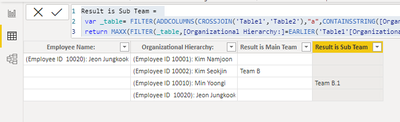
The result I should get is:
| Employee Name: | Organizational Hierarchy: | Result is Main Team | Result is Sub Team |
| (Employee ID 10020): Jeon Jungkook | (Employee ID 10001): Kim Namjoon (Employee ID 10002): Kim Seokjin | Team B | Team B.1 |
It's difficult because the entire org chart is in 1 cell and I just need to get 1st is their Main Team (in this example is Team B) and their sub group (in this example is Team B.1). The look up list is very long but that is basically the gist of it.
A powerquery solution or dax formula would be very helpful. Thank you!
Solved! Go to Solution.
Hi @Honne2021 ,
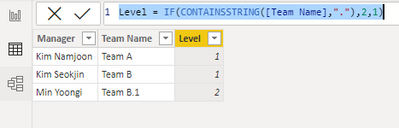
Add a Level column first:
Level = IF(CONTAINSSTRING([Team Name],"."),2,1)
Then try:
Result is Main Team =
var _table= FILTER(ADDCOLUMNS(CROSSJOIN('Table1','Table2'),"a",CONTAINSSTRING([Organizational Hierarchy:],[Manager])),[a]=TRUE())
return MAXX(FILTER(_table,[Organizational Hierarchy:]=EARLIER('Table1'[Organizational Hierarchy:]) && [Level]=1 && [Team Name]<>"Team A"),[Team Name])
Result is Sub Team =
var _table= FILTER(ADDCOLUMNS(CROSSJOIN('Table1','Table2'),"a",CONTAINSSTRING([Organizational Hierarchy:],[Manager])),[a]=TRUE())
return MAXX(FILTER(_table,[Organizational Hierarchy:]=EARLIER('Table1'[Organizational Hierarchy:]) && [Level]=2 && [Team Name]<>"Team A"),[Team Name])
Best Regards,
Eyelyn Qin
If this post helps, then please consider Accept it as the solution to help the other members find it more quickly.
Hi @Honne2021 ,
Add a Level column first:
Level = IF(CONTAINSSTRING([Team Name],"."),2,1)
Then try:
Result is Main Team =
var _table= FILTER(ADDCOLUMNS(CROSSJOIN('Table1','Table2'),"a",CONTAINSSTRING([Organizational Hierarchy:],[Manager])),[a]=TRUE())
return MAXX(FILTER(_table,[Organizational Hierarchy:]=EARLIER('Table1'[Organizational Hierarchy:]) && [Level]=1 && [Team Name]<>"Team A"),[Team Name])
Result is Sub Team =
var _table= FILTER(ADDCOLUMNS(CROSSJOIN('Table1','Table2'),"a",CONTAINSSTRING([Organizational Hierarchy:],[Manager])),[a]=TRUE())
return MAXX(FILTER(_table,[Organizational Hierarchy:]=EARLIER('Table1'[Organizational Hierarchy:]) && [Level]=2 && [Team Name]<>"Team A"),[Team Name])
Best Regards,
Eyelyn Qin
If this post helps, then please consider Accept it as the solution to help the other members find it more quickly.
Thank you for looking into this!
I'd strongly recommend splitting the hierarchy into multiple rows before trying to work with it further.
Why is the result Team B rather than Team A? You only want to consider the two levels above?
Thank you for looking into this. The result is Team B because Team A is assumed to be the leadership team's group, the c-level employees like the CFO, CEO and the likes..I only need to get the employee's main team and their sub team. I did not break up the org hierarchy and just used the Lookupvalue formula in dax but it did not work.
Check out the April 2026 Power BI update to learn about new features.
Sign up to receive a private message when registration opens and key events begin.
If you have recently started exploring Fabric, we'd love to hear how it's going. Your feedback can help with product improvements.
| User | Count |
|---|---|
| 7 | |
| 5 | |
| 4 | |
| 3 | |
| 3 |