Join us at FabCon Atlanta from March 16 - 20, 2026, for the ultimate Fabric, Power BI, AI and SQL community-led event. Save $200 with code FABCOMM.
Register now!Vote for your favorite vizzies from the Power BI Dataviz World Championship submissions. Vote now!
Hi!
I have an SQL query in which I'm extracting some dables and in this query I specified that I only want to extract last 300 days of data. Does it make sense to use RangeStart and RangeEnd parameters after that?
Thanks for your help 🙂
Hi @kzielinska
If you just want to extrat the last 300 days of data, you can just filter the data .
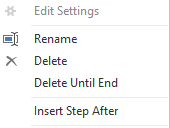
Insert a new step
Then input the following code.
= Table.SelectRows(#"Renamed Columns"(your last step name), each ([Date]>=Date.AddDays(Date.From(DateTime.LocalNow()),-300)) and ([Date]<Date.From(DateTime.LocalNow())))
Best Regards!
Yolo Zhu
If this post helps, then please consider Accept it as the solution to help the other members find it more quickly.
yes, I understand that, but on top of that I want to incrementally refresh my data. Does it make sense if I refresh incrementally after a query like that?
so does it make sense to use RangeStart and RangeEnd parameters after?
Additionally, RangeStart should be equal to the date before which I want to archive the data? or to the date after which I want to start incrementally refresh the data?
My query is like this:
select * from table where date<getdate() and datediff(dd,date,getdate())<300
The Power BI Data Visualization World Championships is back! It's time to submit your entry.
If you love stickers, then you will definitely want to check out our Community Sticker Challenge!
Check out the January 2026 Power BI update to learn about new features.
| User | Count |
|---|---|
| 5 | |
| 5 | |
| 4 | |
| 3 | |
| 3 |