FabCon is coming to Atlanta
Join us at FabCon Atlanta from March 16 - 20, 2026, for the ultimate Fabric, Power BI, AI and SQL community-led event. Save $200 with code FABCOMM.
Register now!- Power BI forums
- Get Help with Power BI
- Desktop
- Service
- Report Server
- Power Query
- Mobile Apps
- Developer
- DAX Commands and Tips
- Custom Visuals Development Discussion
- Health and Life Sciences
- Power BI Spanish forums
- Translated Spanish Desktop
- Training and Consulting
- Instructor Led Training
- Dashboard in a Day for Women, by Women
- Galleries
- Data Stories Gallery
- Themes Gallery
- Contests Gallery
- QuickViz Gallery
- Quick Measures Gallery
- Visual Calculations Gallery
- Notebook Gallery
- Translytical Task Flow Gallery
- TMDL Gallery
- R Script Showcase
- Webinars and Video Gallery
- Ideas
- Custom Visuals Ideas (read-only)
- Issues
- Issues
- Events
- Upcoming Events
The Power BI Data Visualization World Championships is back! Get ahead of the game and start preparing now! Learn more
- Power BI forums
- Forums
- Get Help with Power BI
- Power Query
- Re: Incorporating Group by Max in Table.SelectRows
- Subscribe to RSS Feed
- Mark Topic as New
- Mark Topic as Read
- Float this Topic for Current User
- Bookmark
- Subscribe
- Printer Friendly Page


- Mark as New
- Bookmark
- Subscribe
- Mute
- Subscribe to RSS Feed
- Permalink
- Report Inappropriate Content
Incorporating Group by Max in Table.SelectRows
I have a dataset and I want Table.SelectRows to return the rows that has max fileIndex group by file Name.
I can currently do this
let
    Source = Table.FromRows(Json.Document(Binary.Decompress(Binary.FromText("i45WSjNU0lEC4WinzLzEospYpVgdqKgRVlFjDFEjrCYYYTXBCKcJJiiisQA=", BinaryEncoding.Base64), Compression.Deflate)), let _t = ((type nullable text) meta [Serialized.Text = true]) in type table [fileName = _t, fileIndex = _t, Content = _t]),
    ct = Table.TransformColumnTypes(Source,{{"fileName", type text}, {"fileIndex", Int64.Type}, {"Content", type text}}),
    #"Added Custom" = Table.AddColumn(ct, "Custom", each Table.SelectRows(
        ct,
        (r) => r[fileName]
            = [fileName] and
           r[fileIndex]
            = List.Max(Table.SelectRows(ct, (q) => q[fileName] = [fileName])[fileIndex])
      ))
in
    #"Added Custom"
but instead of adding a column I want to utilize that in Table .SelectRows so that it returns the filtered rows only that have the max fileIndex group by fileName.
This is what I tried which does not work
let
    Source = Table.FromRows(Json.Document(Binary.Decompress(Binary.FromText("i45WSjNU0lEC4WinzLzEospYpVgdqKgRVlFjDFEjrCYYYTXBCKcJJiiisQA=", BinaryEncoding.Base64), Compression.Deflate)), let _t = ((type nullable text) meta [Serialized.Text = true]) in type table [fileName = _t, fileIndex = _t, Content = _t]),
    ct = Table.TransformColumnTypes(Source,{{"fileName", type text}, {"fileIndex", Int64.Type}, {"Content", type text}}),
    Custom1 = Table.SelectRows(
        ct, each
        (r) => r[fileName]
            = [fileName] and
           r[fileIndex]
            = List.Max(Table.SelectRows(ct, (q) => q[fileName] = [fileName])[fileIndex])
      )
in
    Custom1
DAX equivalent is

pbix is attached
Thank you in advance
Solved! Go to Solution.

- Mark as New
- Bookmark
- Subscribe
- Mute
- Subscribe to RSS Feed
- Permalink
- Report Inappropriate Content
Group and filter:
let
    Source = Table.FromRows(Json.Document(Binary.Decompress(Binary.FromText("i45WSjNU0lEC4WinzLzEospYpVgdqKgRVlFjDFEjrCYYYTXBCKcJJiiisQA=", BinaryEncoding.Base64), Compression.Deflate)), let _t = ((type nullable text) meta [Serialized.Text = true]) in type table [fileName = _t, fileIndex = _t, Content = _t]),
    ct = Table.TransformColumnTypes(Source,{{"fileName", type text}, {"fileIndex", Int64.Type}, {"Content", type text}}),

    #"Max fileIndex per filName" = Table.Group(ct,{"fileName"},{
        {"filtered", each Table.FromRecords({Table.Max(_,"fileIndex" )}),
            type table[fileName=text, fileIndex=Int64.Type, Content=text]}
        }),
    #"Expanded filtered" = Table.ExpandTableColumn(#"Max fileIndex per filName", "filtered", {"fileIndex", "Content"})
in
    #"Expanded filtered"

- Mark as New
- Bookmark
- Subscribe
- Mute
- Subscribe to RSS Feed
- Permalink
- Report Inappropriate Content
This might help. Check out my Approach #4 in particular:
Here's a version with Table.Join instead of Table.NestedJoin:
let
    Source = Table.FromRows(Json.Document(Binary.Decompress(Binary.FromText("i45WSjNU0lEC4WinzLzEospYpVgdqKgRVlFjDFEjrCYYYTXBCKcJJiiisQA=", BinaryEncoding.Base64), Compression.Deflate)), let _t = ((type nullable text) meta [Serialized.Text = true]) in type table [fileName = _t, fileIndex = _t, Content = _t]),
    ct = Table.TransformColumnTypes(Source,{{"fileName", type text}, {"fileIndex", Int64.Type}, {"Content", type text}}),
    #"Grouped Rows" = Table.Group(ct, {"fileName"}, {{"fileIndex", each List.Max([fileIndex]), type nullable number}}),
    #"Merged Queries" = Table.Join(ct, {"fileName", "fileIndex"}, #"Grouped Rows", {"fileName", "fileIndex"}, JoinKind.Inner)
in
    #"Merged Queries"

- Mark as New
- Bookmark
- Subscribe
- Mute
- Subscribe to RSS Feed
- Permalink
- Report Inappropriate Content
In terms of performance, Table.Group() is better. All in all, try to use database to finish this task.
let
    Source = Table.FromRows(Json.Document(Binary.Decompress(Binary.FromText("i45WSjNU0lEC4WinzLzEospYpVgdqKgRVlFjDFEjrCYYYTXBCKcJJiiisQA=", BinaryEncoding.Base64), Compression.Deflate)), let _t = ((type nullable text) meta [Serialized.Text = true]) in type table [fileName = _t, fileIndex = _t, Content = _t]),
    ct = Table.TransformColumnTypes(Source,{{"fileName", type text}, {"fileIndex", Int64.Type}, {"Content", type text}}),
    Grouped = Table.Group(ct, "fileName", {"grp", each Table.Max(_, "fileIndex")}),
    #"Expanded grp" = Table.ExpandRecordColumn(Grouped, "grp", {"fileIndex", "Content"}, {"fileIndex", "Content"})
in
    #"Expanded grp"
-- for SQL Server
WITH cte_rn
AS (SELECT *
, Row_number ()
OVER (
partition BY filename
ORDER BY fileindex DESC) AS RN
FROM yearly_sales)
SELECT *
FROM cte_rn
WHERE rn = 1
| Thanks to the great efforts by MS engineers to simplify syntax of DAX! Most beginners are SUCCESSFULLY MISLED to think that they could easily master DAX; but it turns out that the intricacy of the most frequently used RANKX() is still way beyond their comprehension! |
DAX is simple, but NOT EASY! |
- Mark as New
- Bookmark
- Subscribe
- Mute
- Subscribe to RSS Feed
- Permalink
- Report Inappropriate Content
In terms of performance, Table.Group() is better. All in all, try to use database to finish this task.
let
    Source = Table.FromRows(Json.Document(Binary.Decompress(Binary.FromText("i45WSjNU0lEC4WinzLzEospYpVgdqKgRVlFjDFEjrCYYYTXBCKcJJiiisQA=", BinaryEncoding.Base64), Compression.Deflate)), let _t = ((type nullable text) meta [Serialized.Text = true]) in type table [fileName = _t, fileIndex = _t, Content = _t]),
    ct = Table.TransformColumnTypes(Source,{{"fileName", type text}, {"fileIndex", Int64.Type}, {"Content", type text}}),
    Grouped = Table.Group(ct, "fileName", {"grp", each Table.Max(_, "fileIndex")}),
    #"Expanded grp" = Table.ExpandRecordColumn(Grouped, "grp", {"fileIndex", "Content"}, {"fileIndex", "Content"})
in
    #"Expanded grp"
-- for SQL Server
WITH cte_rn
AS (SELECT *
, Row_number ()
OVER (
partition BY filename
ORDER BY fileindex DESC) AS RN
FROM yearly_sales)
SELECT *
FROM cte_rn
WHERE rn = 1
| Thanks to the great efforts by MS engineers to simplify syntax of DAX! Most beginners are SUCCESSFULLY MISLED to think that they could easily master DAX; but it turns out that the intricacy of the most frequently used RANKX() is still way beyond their comprehension! |
DAX is simple, but NOT EASY! |
- Mark as New
- Bookmark
- Subscribe
- Mute
- Subscribe to RSS Feed
- Permalink
- Report Inappropriate Content
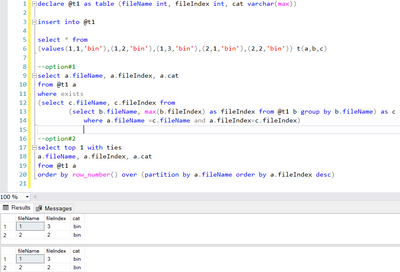
How much I wish that the data already went to a server so that I did not have to use PQ. I have nothing against PQ but it is not scalable. Datamart is also switched off (org-level) which is why can't take advantage of that too.
While we are still at it, other TSQL to pull the same string
declare @t1 as table (fileName int, fileIndex int, cat varchar(max))

insert into @t1

select * from
(values(1,1,'bin'),(1,2,'bin'),(1,3,'bin'),(2,1,'bin'),(2,2,'bin')) t(a,b,c)

--option#1
select a.fileName, a.fileIndex, a.cat
from @t1 a
where exists
(select c.fileName, c.fileIndex from
		(select b.fileName, max(b.fileIndex) as fileIndex from @t1 b group by b.fileName) as c
			where a.fileName =c.fileName and a.fileIndex=c.fileIndex)

--option#2
select top 1 with ties
a.fileName, a.fileIndex, a.cat
from @t1 a
order by row_number() over (partition by a.fileName order by a.fileIndex desc)
- Mark as New
- Bookmark
- Subscribe
- Mute
- Subscribe to RSS Feed
- Permalink
- Report Inappropriate Content
This might help. Check out my Approach #4 in particular:
Here's a version with Table.Join instead of Table.NestedJoin:
let
    Source = Table.FromRows(Json.Document(Binary.Decompress(Binary.FromText("i45WSjNU0lEC4WinzLzEospYpVgdqKgRVlFjDFEjrCYYYTXBCKcJJiiisQA=", BinaryEncoding.Base64), Compression.Deflate)), let _t = ((type nullable text) meta [Serialized.Text = true]) in type table [fileName = _t, fileIndex = _t, Content = _t]),
    ct = Table.TransformColumnTypes(Source,{{"fileName", type text}, {"fileIndex", Int64.Type}, {"Content", type text}}),
    #"Grouped Rows" = Table.Group(ct, {"fileName"}, {{"fileIndex", each List.Max([fileIndex]), type nullable number}}),
    #"Merged Queries" = Table.Join(ct, {"fileName", "fileIndex"}, #"Grouped Rows", {"fileName", "fileIndex"}, JoinKind.Inner)
in
#"Merged Queries"- Mark as New
- Bookmark
- Subscribe
- Mute
- Subscribe to RSS Feed
- Permalink
- Report Inappropriate Content
Group and filter:
let
    Source = Table.FromRows(Json.Document(Binary.Decompress(Binary.FromText("i45WSjNU0lEC4WinzLzEospYpVgdqKgRVlFjDFEjrCYYYTXBCKcJJiiisQA=", BinaryEncoding.Base64), Compression.Deflate)), let _t = ((type nullable text) meta [Serialized.Text = true]) in type table [fileName = _t, fileIndex = _t, Content = _t]),
    ct = Table.TransformColumnTypes(Source,{{"fileName", type text}, {"fileIndex", Int64.Type}, {"Content", type text}}),

    #"Max fileIndex per filName" = Table.Group(ct,{"fileName"},{
        {"filtered", each Table.FromRecords({Table.Max(_,"fileIndex" )}),
            type table[fileName=text, fileIndex=Int64.Type, Content=text]}
        }),
    #"Expanded filtered" = Table.ExpandTableColumn(#"Max fileIndex per filName", "filtered", {"fileIndex", "Content"})
in
    #"Expanded filtered"
- Mark as New
- Bookmark
- Subscribe
- Mute
- Subscribe to RSS Feed
- Permalink
- Report Inappropriate Content
@ronrsnfld thanks for this, I am going to use this on a 12mil data source which has not been incorporated into any server yet.
Hence, I am looking for a working and optimized solution. Is it the most optimized solution?
- Mark as New
- Bookmark
- Subscribe
- Mute
- Subscribe to RSS Feed
- Permalink
- Report Inappropriate Content
I don't know how optimal this is. Often things may be faster if you can get it done on the server. Maybe someone will contribute a different solution and you can test it.

Helpful resources

Power BI Dataviz World Championships
The Power BI Data Visualization World Championships is back! Get ahead of the game and start preparing now!

Power BI Monthly Update - December 2025
Check out the December 2025 Power BI Holiday Recap!

FabCon Atlanta 2026
Join us at FabCon Atlanta, March 16-20, for the ultimate Fabric, Power BI, AI and SQL community-led event. Save $200 with code FABCOMM.


| User | Count |
|---|---|
| 19 | |
| 9 | |
| 8 | |
| 7 | |
| 6 |


