cancel
Showing results for 
Search instead for 
Did you mean: 

July 7 - July 17 | Round 2 of the Power BI Dataviz World Championships. Don't miss your chance! Learn more

Reply
StephenK
Resolver I
Resolver I

Inaccurate Decimal Numbers

Can someone explain this to me?

I have an excel table that i have imported into power query. 

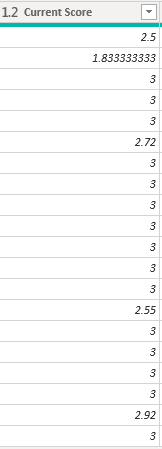
I have a column [Current Score] with datatype decimal number. (See green highlighted column and note the values 1.83333333 and especially the 2.55) 

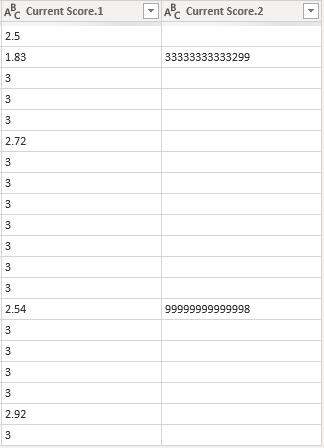
I apply a split column by first four characters to truncate to two decimals without rounding. Now note the 1.83 and the 2.55 which is now 2.54. 


screen1.pngscreen2.png


To make it even more confusing, the value in the excel table is 2.55 not 2.549999999999998. Does anyone know why Power Query would be doing this? It creates a serious data integrity problem.

1 ACCEPTED SOLUTION
Jimmy801
Community Champion
Community Champion

Hello @StephenK 


I just can confirm you that it's like that. It's really weird. Try to open a ticket.

However there are some workarounds. Transform you raw data (without any changed type) with the round-function and put 10.

Jimmy801_0-1615054716637.png

or you transform it and multiply your data with 1

Jimmy801_1-1615054893308.png


In the other workarounds you have to change your Excel. You can save your workbook as CSV-file or format your content as text.


If this post helps or solves your problem, please mark it as solution (to help other users find useful content and to acknowledge the work of users that helped you)
Kudoes are nice too

Have fun

Jimmy

View solution in original post

4 REPLIES 4
Jimmy801
Community Champion
Community Champion

Hello @StephenK 


I just can confirm you that it's like that. It's really weird. Try to open a ticket.

However there are some workarounds. Transform you raw data (without any changed type) with the round-function and put 10.

Jimmy801_0-1615054716637.png

or you transform it and multiply your data with 1

Jimmy801_1-1615054893308.png


In the other workarounds you have to change your Excel. You can save your workbook as CSV-file or format your content as text.


If this post helps or solves your problem, please mark it as solution (to help other users find useful content and to acknowledge the work of users that helped you)
Kudoes are nice too

Have fun

Jimmy

@Jimmy801 thanks for the workaround! Seemed to do the trick. Really appreciate it!


Still kinda frustrated though--would like to hear from anyone on the Power BI dev team about this. It's concerning to me that queries become innacurate as a result of this bug. One would think that there would not be any data integrity issues between Excel and Power BI given they are both Microsoft products.


If we can't count on the platform to at least maintain accurate queries why would we use it...


Hello @StephenK 


I completely agree. I can try to forward this somehow. However I marked my workaround as solution.


BR


Jimmy

HotChilli
Community Champion
Community Champion

Can you show us the Advanced editor code (including the split column) please?

Helpful resources

Announcements
FabCon and SQLCon Barcelona 2026

FabCon & SQLCon – Barcelona 2026

Join us in Barcelona for FabCon and SQLCon, the Fabric, Power BI, SQL, and AI community event. Save €200 with code FABCMTY200.

60 days of Data Days Carousel

Data Days 2026

Join Fabric Data Days 2026: 60 days of free live/on-demand sessions, challenges, study groups, and certification opportunities.

Power BI DataViz World Championships carousel

Power BI DataViz World Championships - June 2026

A new Power BI DataViz World Championship is coming this June! Don't miss out on submitting your entry.