cancel
Showing results for 
Search instead for 
Did you mean: 

Join the FabCon + SQLCon recap series. Up next: Power BI, Real-Time Intelligence, IQ and AI, and Data Factory take center stage. All sessions are available on-demand after the live show. Register now

Reply
JithinPlr
New Member

If Condition - Power Query

Hi All,


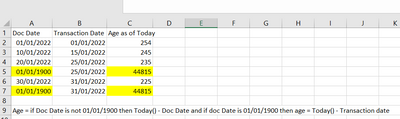
Can anyone suggest a formula for the below scenario, since im relatively new to Power BI and the formula which i have used is not working. Thanks in Advance


JithinPlr_0-1662987540667.png


2 ACCEPTED SOLUTIONS
goncalogeraldes
Super User
Super User

Hello there @JithinPlr , you can add the following step to your query:


#"Added Custom" = Table.AddColumn(#"Removed Other Columns", "Age as of Today", each if [Doc Date] <> #date(1900, 1, 1) then Date.From(DateTime.LocalNow()) - [Doc Date] else Date.From(DateTime.LocalNow()) - [Transaction Date])


Hope this answer solves your problem!
If you need any additional help please @ me in your reply.
If my reply provided you with a solution, please consider marking it as a solution ✔️ or giving it a kudoe 👍
Thanks!

You can also check out my LinkedIn!

Best regards,
Gonçalo Geraldes


View solution in original post

v-jingzhang
Community Support
Community Support

Hi @JithinPlr 


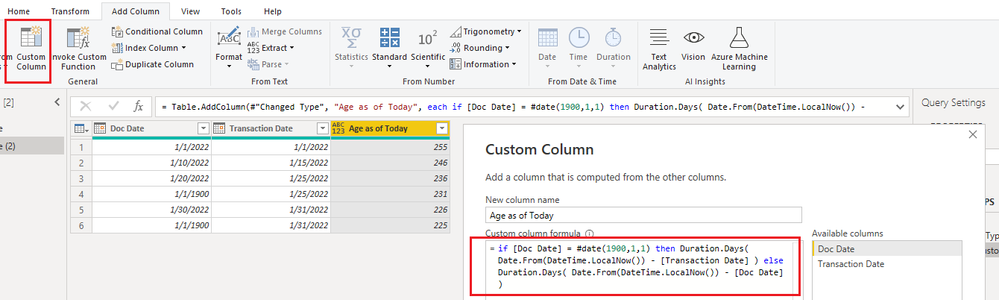
You can create a custom column with Power Query. 

if [Doc Date] = #date(1900,1,1) then Duration.Days( Date.From(DateTime.LocalNow()) - [Transaction Date] ) else Duration.Days( Date.From(DateTime.LocalNow()) - [Doc Date] )

vjingzhang_0-1663059630196.png


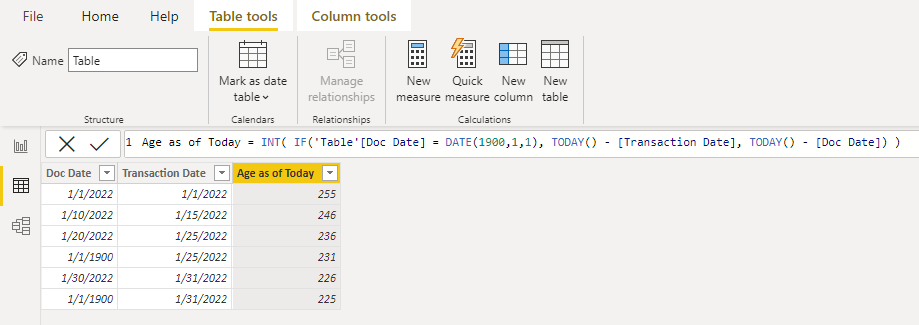
Or create a calculated column with DAX. 

Age as of Today = INT( IF('Table'[Doc Date] = DATE(1900,1,1), TODAY() - [Transaction Date], TODAY() - [Doc Date]) )

vjingzhang_1-1663060660455.png


Best Regards,
Community Support Team _ Jing
If this post helps, please Accept it as Solution to help other members find it.

View solution in original post

2 REPLIES 2
v-jingzhang
Community Support
Community Support

Hi @JithinPlr 


You can create a custom column with Power Query. 

if [Doc Date] = #date(1900,1,1) then Duration.Days( Date.From(DateTime.LocalNow()) - [Transaction Date] ) else Duration.Days( Date.From(DateTime.LocalNow()) - [Doc Date] )

vjingzhang_0-1663059630196.png


Or create a calculated column with DAX. 

Age as of Today = INT( IF('Table'[Doc Date] = DATE(1900,1,1), TODAY() - [Transaction Date], TODAY() - [Doc Date]) )

vjingzhang_1-1663060660455.png


Best Regards,
Community Support Team _ Jing
If this post helps, please Accept it as Solution to help other members find it.

goncalogeraldes
Super User
Super User

Hello there @JithinPlr , you can add the following step to your query:


#"Added Custom" = Table.AddColumn(#"Removed Other Columns", "Age as of Today", each if [Doc Date] <> #date(1900, 1, 1) then Date.From(DateTime.LocalNow()) - [Doc Date] else Date.From(DateTime.LocalNow()) - [Transaction Date])


Hope this answer solves your problem!
If you need any additional help please @ me in your reply.
If my reply provided you with a solution, please consider marking it as a solution ✔️ or giving it a kudoe 👍
Thanks!

You can also check out my LinkedIn!

Best regards,
Gonçalo Geraldes


Helpful resources

Announcements
April Power BI Update Carousel

Power BI Monthly Update - April 2026

Check out the April 2026 Power BI update to learn about new features.

New to Fabric survey Carousel

New to Fabric Survey

If you have recently started exploring Fabric, we'd love to hear how it's going. Your feedback can help with product improvements.

Power BI DataViz World Championships carousel

Power BI DataViz World Championships - June 2026

A new Power BI DataViz World Championship is coming this June! Don't miss out on submitting your entry.

FabCon and SQLCon Highlights Carousel

FabCon & SQLCon Highlights

Experience the highlights from FabCon & SQLCon, available live and on-demand starting April 14th.