cancel
Showing results for 
Search instead for 
Did you mean: 

July 7 - July 17 | Round 2 of the Power BI Dataviz World Championships. Don't miss your chance! Learn more

Reply
JithinPlr
New Member

If Condition - Power Query

Hi All,


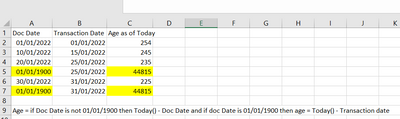
Can anyone suggest a formula for the below scenario, since im relatively new to Power BI and the formula which i have used is not working. Thanks in Advance


JithinPlr_0-1662987540667.png


2 ACCEPTED SOLUTIONS
goncalogeraldes
Super User
Super User

Hello there @JithinPlr , you can add the following step to your query:


#"Added Custom" = Table.AddColumn(#"Removed Other Columns", "Age as of Today", each if [Doc Date] <> #date(1900, 1, 1) then Date.From(DateTime.LocalNow()) - [Doc Date] else Date.From(DateTime.LocalNow()) - [Transaction Date])


Hope this answer solves your problem!
If you need any additional help please @ me in your reply.
If my reply provided you with a solution, please consider marking it as a solution ✔️ or giving it a kudoe 👍
Thanks!

You can also check out my LinkedIn!

Best regards,
Gonçalo Geraldes


View solution in original post

v-jingzhang
Community Support
Community Support

Hi @JithinPlr 


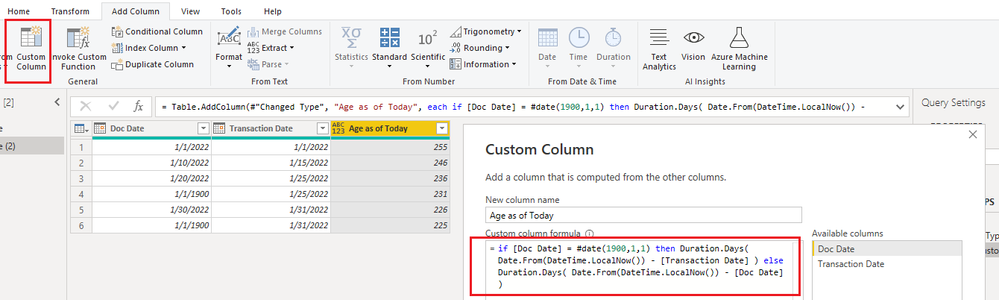
You can create a custom column with Power Query. 

if [Doc Date] = #date(1900,1,1) then Duration.Days( Date.From(DateTime.LocalNow()) - [Transaction Date] ) else Duration.Days( Date.From(DateTime.LocalNow()) - [Doc Date] )

vjingzhang_0-1663059630196.png


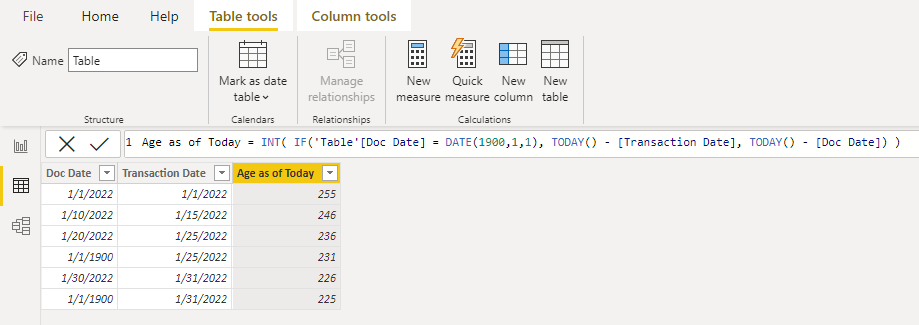
Or create a calculated column with DAX. 

Age as of Today = INT( IF('Table'[Doc Date] = DATE(1900,1,1), TODAY() - [Transaction Date], TODAY() - [Doc Date]) )

vjingzhang_1-1663060660455.png


Best Regards,
Community Support Team _ Jing
If this post helps, please Accept it as Solution to help other members find it.

View solution in original post

2 REPLIES 2
v-jingzhang
Community Support
Community Support

Hi @JithinPlr 


You can create a custom column with Power Query. 

if [Doc Date] = #date(1900,1,1) then Duration.Days( Date.From(DateTime.LocalNow()) - [Transaction Date] ) else Duration.Days( Date.From(DateTime.LocalNow()) - [Doc Date] )

vjingzhang_0-1663059630196.png


Or create a calculated column with DAX. 

Age as of Today = INT( IF('Table'[Doc Date] = DATE(1900,1,1), TODAY() - [Transaction Date], TODAY() - [Doc Date]) )

vjingzhang_1-1663060660455.png


Best Regards,
Community Support Team _ Jing
If this post helps, please Accept it as Solution to help other members find it.

goncalogeraldes
Super User
Super User

Hello there @JithinPlr , you can add the following step to your query:


#"Added Custom" = Table.AddColumn(#"Removed Other Columns", "Age as of Today", each if [Doc Date] <> #date(1900, 1, 1) then Date.From(DateTime.LocalNow()) - [Doc Date] else Date.From(DateTime.LocalNow()) - [Transaction Date])


Hope this answer solves your problem!
If you need any additional help please @ me in your reply.
If my reply provided you with a solution, please consider marking it as a solution ✔️ or giving it a kudoe 👍
Thanks!

You can also check out my LinkedIn!

Best regards,
Gonçalo Geraldes


Helpful resources

Announcements
FabCon and SQLCon Barcelona 2026

FabCon & SQLCon – Barcelona 2026

Join us in Barcelona for FabCon and SQLCon, the Fabric, Power BI, SQL, and AI community event. Save €200 with code FABCMTY200.

60 days of Data Days Carousel

Data Days 2026

Join Fabric Data Days 2026: 60 days of free live/on-demand sessions, challenges, study groups, and certification opportunities.

Power BI DataViz World Championships carousel

Power BI DataViz World Championships - June 2026

A new Power BI DataViz World Championship is coming this June! Don't miss out on submitting your entry.