Don't miss your chance to take the Fabric Data Engineer (DP-600) exam for FREE! Find out how by attending the DP-600 session on April 23rd (pacific time), live or on-demand.
Learn moreJoin the FabCon + SQLCon recap series. Up next: Power BI, Real-Time Intelligence, IQ and AI, and Data Factory take center stage. All sessions are available on-demand after the live show. Register now
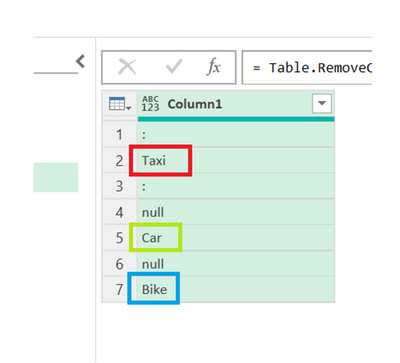
How to check duplicate values in a column1, create new adde column, if in case duplicate values present in the column1 display as well new added column ...
With out grouping, Is there any alternativies to fing the duplicates ?like IF condition like this,,
ex: i have tried somthing in statically : if ([Column1] <> "null") then Table.RowCount(Table.SelectRows(#"Changed Type5", each ([Column1] = "Bike"))) else ""
but is there in any altenativies.....
Ex :
hi @durgaraop21 try this
lst = List.Buffer(List.RemoveNulls(prev_step[Column1])),
next_step = Table.AddColumn(prev_step, "cnt", (x) => if x[Column1] = null then "" else List.Count(List.PositionOf(lst, x[Column1], Occurrence.All)))
Thanks for the reply, But not working above Logic, Use only Power query Editor only.....
Check out the April 2026 Power BI update to learn about new features.
If you have recently started exploring Fabric, we'd love to hear how it's going. Your feedback can help with product improvements.
A new Power BI DataViz World Championship is coming this June! Don't miss out on submitting your entry.
| User | Count |
|---|---|
| 5 | |
| 3 | |
| 3 | |
| 3 | |
| 3 |
| User | Count |
|---|---|
| 7 | |
| 6 | |
| 5 | |
| 5 | |
| 4 |