cancel
Showing results for 
Search instead for 
Did you mean: 

The Power BI Data Visualization World Championships is back! Get ahead of the game and start preparing now! Learn more

Reply
philthomasp
New Member

IF statement issue

Hello,

I'm new to Power Query, and I am working on a formula where I will create a Custom Column, and what I need the new column to provide is the following:


subtract 2 date columns and return the number of days

IF the result is less than 0, return 0, otherwise return the vaule


So, based off what I've read, this is my current formula:


=IF ([Closed On.1]-[Due On.1] < 0, 0, [Closed On.1]-[Due On.1])


This gives me no syntax errors, but when I close the window, PQ immediately gives me a "The name 'IF' wasn't recognized.


What is happening that would cause the error even if my syntax is correct?


1 ACCEPTED SOLUTION
Thejeswar
Super User
Super User

Hi @philthomasp ,

The Issue could be because subtracting two dates would return a date and not a number to use with a relational operator <. So alternatively create a measure having DATEDIFF function in it as shown below


Measure = IF(DATEDIFF(MAX(Table3[Drte2]),MAX(Table3[Dte1]),DAY) < 0, 0, DATEDIFF(MAX(Table3[Drte2]),MAX(Table3[Dte1]),DAY))


Rgds, 

View solution in original post

4 REPLIES 4
Thejeswar
Super User
Super User

Hi @philthomasp ,

The Issue could be because subtracting two dates would return a date and not a number to use with a relational operator <. So alternatively create a measure having DATEDIFF function in it as shown below


Measure = IF(DATEDIFF(MAX(Table3[Drte2]),MAX(Table3[Dte1]),DAY) < 0, 0, DATEDIFF(MAX(Table3[Drte2]),MAX(Table3[Dte1]),DAY))


Rgds, 

Nathaniel_C
Community Champion
Community Champion

Hi @philthomasp ,
Try "if" in m language which is what Power Query uses. Or try using a conditional column rather than a custom column.
Let me know if you have any questions.

If this solves your issues, please mark it as the solution, so that others can find it easily. Kudos 👍are nice too.
Nathaniel


Did I answer your question? Mark my post as a solution!

Proud to be a Super User!


Just for my own knowledge, but to clarify...m language is what we see when creating a custom column, and DAX is the advanced editor?

Hello @philthomasp ,
m language is what is used in Power Query and is shown in the Advanced Editor. DAX is used in Power BI, Excel and elsewhere. 

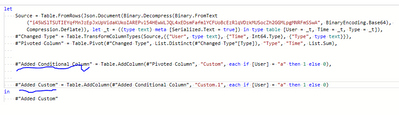
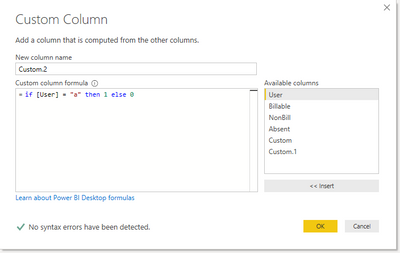
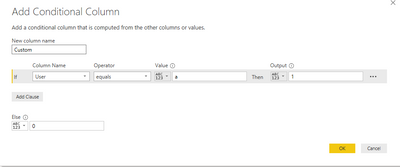
 Table.AddColumn(#"Pivoted Column", "Custom", each if [User] = "a" then 1 else 0)

So, I added the a custom column using the UI and above is what shown in the formula bar. The three pictures below, from the bottom, show the same conditional and custom column, and then it is shown in the Advanced Editor. From an efficiency standpoint, most of the time you can create measures (Using DAX) or calculated columns (Using DAX) however calculated columns, are better written in Power Query.

Check out M is for (DATA) Monkey by @KenPuls 

Let me know if you have any questions.

If this solves your issues, please mark it as the solution, so that others can find it easily. Kudos 👍are nice too.
Nathaniel
if12.PNG


if1.PNG


if.PNG


Did I answer your question? Mark my post as a solution!

Proud to be a Super User!


Helpful resources

Announcements
Power BI DataViz World Championships

Power BI Dataviz World Championships

The Power BI Data Visualization World Championships is back! Get ahead of the game and start preparing now!

December 2025 Power BI Update Carousel

Power BI Monthly Update - December 2025

Check out the December 2025 Power BI Holiday Recap!

FabCon Atlanta 2026 carousel

FabCon Atlanta 2026

Join us at FabCon Atlanta, March 16-20, for the ultimate Fabric, Power BI, AI and SQL community-led event. Save $200 with code FABCOMM.