Get certified for free when you join Fabric Data Days 2026 and dive into Fabric, Power BI, SQL, AI, and other essential data skills.
Join nowJuly 28 - August 9 | Final Round of the Power BI Dataviz World Championships. This is your chance. Learn more
Hi Everyone:
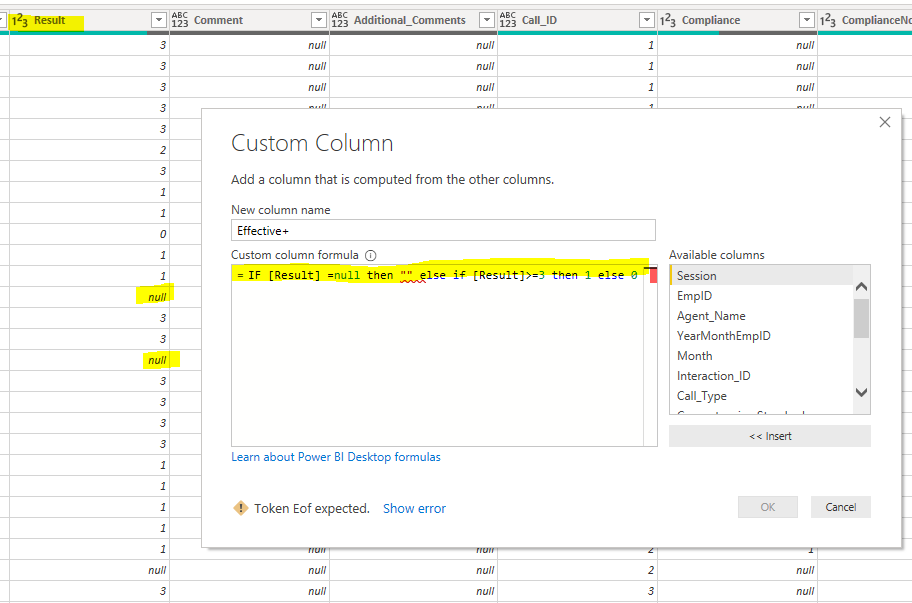
I am creating a new column and I want the formula to give me blank if the "Result" column has null on it. WHat I'm doing wrong? I have been trying to fix the "else if" but it's pretty different than doing it on excel. ![]()
Solved! Go to Solution.
These are different formulas that I have been try to use but always get the "Token Eof expected".
IF [Result] =null then null else if [Result]>=3 then 1 else 0
if ([Result] =null, "",if([Result]>=3,1,0))
if [Result] = "" then "" else [Result]>=3 then 1 else 0
Any tips?
hi @jmuniz
Change "" to null in small case.
Hope that resolves the problem.
If this is the solution then do mark it as a solution and do click on the Upvote button.
Regards,
Pradip Microsoft Certified Trainer
Hi @PradipMCT
After your recommendation I fixed the first part. To give you a background of my purpose of the new column is the following: If the numbers on the "Result" column is 3 or more, give me 1, if not, give me 0. However, since some of the numbers on the "Result" column are in blank, I want power bi to return those as blank also. ![]()
The final purpose is that I will count how many employees have 3 or more.
Join us in Barcelona for FabCon and SQLCon, the Fabric, Power BI, SQL, and AI community event. Save €200 with code FABCMTY200.
If you love stickers, then you will definitely want to check out our community sticker challenge, Barcelona edition!
Check out the July 2026 Power BI update to learn about new features.