cancel
Showing results for 
Search instead for 
Did you mean: 

The Power BI Data Visualization World Championships is back! Get ahead of the game and start preparing now! Learn more

Reply
jmuniz
Frequent Visitor

IF Statement Help

Hi Everyone:


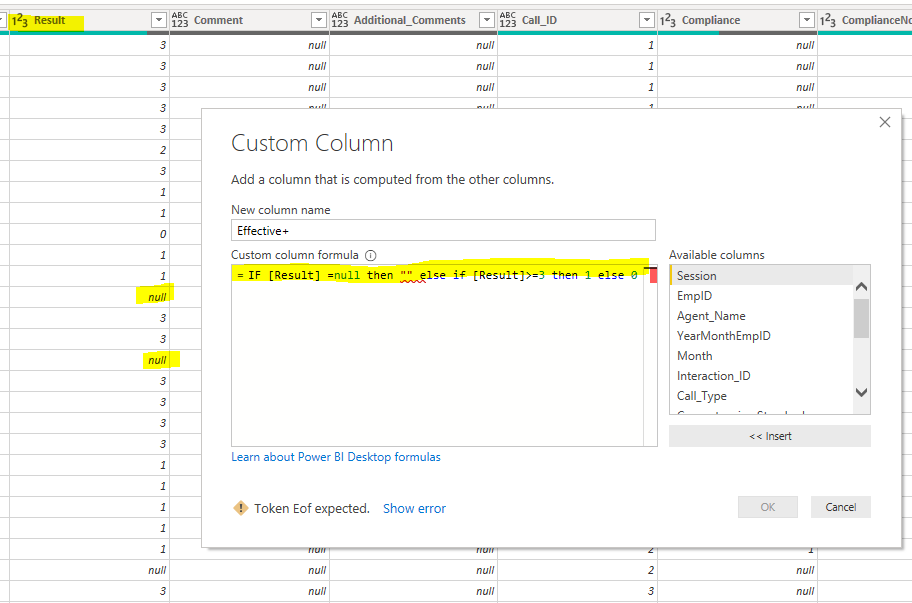
I am creating a new column and I want the formula to give me blank if the "Result" column has null on it. WHat I'm doing wrong? I have been trying to fix the "else if" but it's pretty different than doing it on excel. Smiley Indifferent


Capture.PNG

1 ACCEPTED SOLUTION

Power Query is Case sensitive. Give all IF in small i.e. if.

Use first query but give if in small.

View solution in original post

5 REPLIES 5
jmuniz
Frequent Visitor

These are different formulas that I have been try to use but always get the "Token Eof expected".


IF [Result] =null then null else if [Result]>=3 then 1 else 0

if ([Result] =null, "",if([Result]>=3,1,0))

if [Result] = "" then "" else [Result]>=3 then 1 else 0


Any tips?

Power Query is Case sensitive. Give all IF in small i.e. if.

Use first query but give if in small.

Simple and it worked! Thanks @AnkitBI !

PradipMCT
Resolver II
Resolver II

hi @jmuniz 


Change "" to null in small case. 


Hope that resolves the problem. 


If this is the solution then do mark it as a solution and do click on the Upvote button.


Regards,

Pradip Microsoft Certified Trainer

Pradip's YouTube Channel

Hi @PradipMCT 


After your recommendation I fixed the first part. To give you a background of my purpose of the new column is the following: If the numbers on the "Result" column is 3 or more, give me 1, if not, give me 0. However, since some of the numbers on the "Result" column are in blank, I want power bi to return those as blank also. Smiley Happy


The final purpose is that I will count how many employees have 3 or more.


2.PNG

Helpful resources

Announcements
Power BI DataViz World Championships

Power BI Dataviz World Championships

The Power BI Data Visualization World Championships is back! Get ahead of the game and start preparing now!

December 2025 Power BI Update Carousel

Power BI Monthly Update - December 2025

Check out the December 2025 Power BI Holiday Recap!

FabCon Atlanta 2026 carousel

FabCon Atlanta 2026

Join us at FabCon Atlanta, March 16-20, for the ultimate Fabric, Power BI, AI and SQL community-led event. Save $200 with code FABCOMM.