This is best Fabric, Power BI, SQL and AI community event. How do we know? The last event sold out! Save €200 with code FABCMTY200.
Register nowA new Data Days event is coming soon! This time we’re going bigger than ever. Fabric, Power BI, SQL, AI and more. Don't miss out.
Hi All,
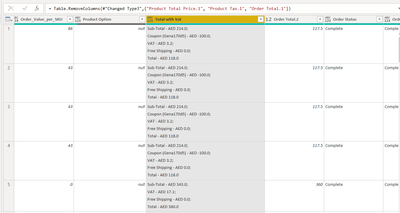
I have a data source as an excel file which has a particular column having multiple information in it.
I want to split the column in different columns. However the challenge i am facing is that some rows in the column have coupon information and some do not. so when i split column with delimiter the row which does not have coupon information should return null instead of filling with VAT information. Can you suggest a workaround in M for this?
Solved! Go to Solution.
If you add custom columns for each sub-field using Text.BetweenDelimiters to find the specific info, for example,
Text.BetweenDelimiters([Total with vat], "Free Shipping", ";") that should do it.
If you add custom columns for each sub-field using Text.BetweenDelimiters to find the specific info, for example,
Text.BetweenDelimiters([Total with vat], "Free Shipping", ";") that should do it.
Sign up to receive a private message when registration opens and key events begin.
If you have recently started exploring Fabric, we'd love to hear how it's going. Your feedback can help with product improvements.