Join us at FabCon Atlanta from March 16 - 20, 2026, for the ultimate Fabric, Power BI, AI and SQL community-led event. Save $200 with code FABCOMM.
Register now!The Power BI Data Visualization World Championships is back! Get ahead of the game and start preparing now! Learn more
Hi All,
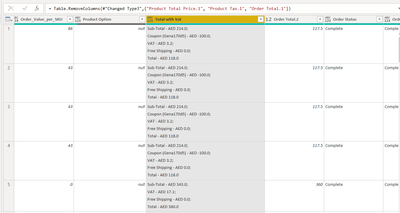
I have a data source as an excel file which has a particular column having multiple information in it.
I want to split the column in different columns. However the challenge i am facing is that some rows in the column have coupon information and some do not. so when i split column with delimiter the row which does not have coupon information should return null instead of filling with VAT information. Can you suggest a workaround in M for this?
Solved! Go to Solution.
If you add custom columns for each sub-field using Text.BetweenDelimiters to find the specific info, for example,
Text.BetweenDelimiters([Total with vat], "Free Shipping", ";") that should do it.
If you add custom columns for each sub-field using Text.BetweenDelimiters to find the specific info, for example,
Text.BetweenDelimiters([Total with vat], "Free Shipping", ";") that should do it.
The Power BI Data Visualization World Championships is back! Get ahead of the game and start preparing now!
| User | Count |
|---|---|
| 19 | |
| 10 | |
| 9 | |
| 8 | |
| 7 |