Get Fabric or SQL Certified for Free.
Get certified for free when you join Fabric Data Days 2026 and dive into Fabric, Power BI, SQL, AI, and other essential data skills.
Join now- Power BI forums
- Get Help with Power BI
- Desktop
- Service
- Report Server
- Power Query
- Mobile Apps
- Developer
- DAX Commands and Tips
- Custom Visuals Development Discussion
- Health and Life Sciences
- Power BI Spanish forums
- Translated Spanish Desktop
- Training and Consulting
- Instructor Led Training
- Dashboard in a Day for Women, by Women
- Galleries
- Data Stories Gallery
- Themes Gallery
- Contests Gallery
- QuickViz Gallery
- Quick Measures Gallery
- Visual Calculations Gallery
- Fabric Apps Gallery
- Notebook Gallery
- Translytical Task Flow Gallery
- TMDL Gallery
- R Script Showcase
- Webinars and Video Gallery
- Ideas
- Custom Visuals Ideas (read-only)
- Issues
- Issues
- Events
- Upcoming Events
July 7 - July 17 | Round 2 of the Power BI Dataviz World Championships. Don't miss your chance! Learn more
- Power BI forums
- Forums
- Get Help with Power BI
- Power Query
- Re: How to solve a schedule refresh problem for ge...
- Subscribe to RSS Feed
- Mark Topic as New
- Mark Topic as Read
- Float this Topic for Current User
- Bookmark
- Subscribe
- Printer Friendly Page

- Mark as New
- Bookmark
- Subscribe
- Mute
- Subscribe to RSS Feed
- Permalink
- Report Inappropriate Content
How to solve a schedule refresh problem for getting data from API?
Hi guys, I am using the below power query code for getting the data from an API. I am using a loop to get the data for many rows as the API can provide onpy 5000 rows for a call. But I am not able to apply data refresh. I even tried using Relative path as suggested by few people, but it's still not working. I cannot provide the API key as it is confidential. Also, keep in mind that I do not want to use personal gateway. Thank you in advance.
let
#"FullQuery" = let
pageSize = 5000,
sendRequest = (page) =>
let
APIKey = "test",
APIUrl = "https://api.genscape.com/",
startDate = Date.ToText(Date.AddMonths(Date.From(DateTimeZone.UtcNow()),-11),"yyyy-MM-dd"),
Response = Web.Contents(
"https://api.genscape.com/",
[
RelativePath ="storage/oil/v1/tank-volumes",
Query=
[
revision="published",
format="json",
startDate=startDate,
limit = Number.ToText(pageSize),
offset = Number.ToText(page * pageSize)
],
Headers=[#"Gen-Api-Key"= APIKey]
]),
Data = Json.Document(Response)[data]
in
Data,
Loop = (page as number, AccumData as list) =>
let
Data = Function.InvokeAfter(()=>sendRequest(page), #duration(0,0,0,2)),
Result =
if List.Count(Data) < pageSize
then Table.FromRecords(List.Combine({AccumData, Data}))
else @Loop(page + 1, List.Combine({AccumData, Data}))
in
Result
in
Loop(0, {})
in
#"FullQuery"
I am getting the below error when I try to schedule refresh.
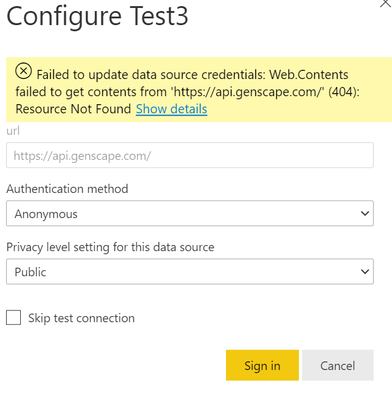
Solved! Go to Solution.


- Mark as New
- Bookmark
- Subscribe
- Mute
- Subscribe to RSS Feed
- Permalink
- Report Inappropriate Content
Sorry I hadn't read your post correctly. What you need is a base URL that actually exists on the service.
https://api.genscape.com/ is not valid (the server refuses to serve that page).
Select "skip test" and ignore the error.
- Mark as New
- Bookmark
- Subscribe
- Mute
- Subscribe to RSS Feed
- Permalink
- Report Inappropriate Content
"But I am not able to apply data refresh"
Please elaborate. What error message did you get?
- Mark as New
- Bookmark
- Subscribe
- Mute
- Subscribe to RSS Feed
- Permalink
- Report Inappropriate Content
Hi lbendlin,
I am getting the below error message.

Thank you,
Yash
- Mark as New
- Bookmark
- Subscribe
- Mute
- Subscribe to RSS Feed
- Permalink
- Report Inappropriate Content
Sorry I hadn't read your post correctly. What you need is a base URL that actually exists on the service.
https://api.genscape.com/ is not valid (the server refuses to serve that page).
Select "skip test" and ignore the error.
- Mark as New
- Bookmark
- Subscribe
- Mute
- Subscribe to RSS Feed
- Permalink
- Report Inappropriate Content
Can you successfully fetch a single page? The first ten records? The error message indicates that the URL is incorrect.
- Mark as New
- Bookmark
- Subscribe
- Mute
- Subscribe to RSS Feed
- Permalink
- Report Inappropriate Content
Yes, I can fetch a single page when I use the below way to load data instead of using query to load many pages using loop.
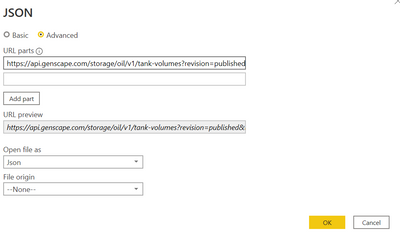


- Mark as New
- Bookmark
- Subscribe
- Mute
- Subscribe to RSS Feed
- Permalink
- Report Inappropriate Content
Hi @Yash48 ,
Try the measure provided by Chris to deal with 404 error from Web.Contents:
Best Regards,
Kelly
Did I answer your question? Mark my reply as a solution!
- Mark as New
- Bookmark
- Subscribe
- Mute
- Subscribe to RSS Feed
- Permalink
- Report Inappropriate Content
Hi Kelly,
That article was not able to solve my problem. The api url is working fine when I use in PowerBI desktop, but not when published.
Thank you,
Yash

Helpful resources

FabCon & SQLCon – Barcelona 2026
Join us in Barcelona for FabCon and SQLCon, the Fabric, Power BI, SQL, and AI community event. Save €200 with code FABCMTY200.

Fabric Community Sticker Challenge - Barcelona 2026
If you love stickers, then you will definitely want to check out our community sticker challenge, Barcelona edition!

Power BI Monthly Update - July 2026
Check out the July 2026 Power BI update to learn about new features.

Power BI DataViz World Championships - June 2026
A new Power BI DataViz World Championship is coming this June! Don't miss out on submitting your entry.


