cancel
Showing results for 
Search instead for 
Did you mean: 

The Power BI Data Visualization World Championships is back! It's time to submit your entry. Live now!

Reply
Anonymous
Not applicable

How to replace multiple inconsistent values with 1 same value

Hi everyone,


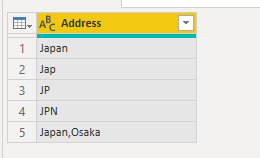
I am new to Power BI and currenlty looking for a solution to replace multiple inconsistent values with 1 same value. eg. one of the columns named "Address" includes values in a different format e.g. "Japan", "Jap", "JP", "JPN", "Japan, Osaka"; all of them refers to "Japan" and I would like to standardize by changing it to "Japan".


May I know is there any simpler way to replace all these different values to Japan efficiently? Instead of using the "Find and Replace Values" method to replace the values 1 by 1?


Any help would be really appreciated.


Thank you very much in advance.

2 ACCEPTED SOLUTIONS
mahoneypat
Microsoft Employee
Microsoft Employee

Please see this article.  Basically, you need to create a list of lists to be used inside a step with List.ReplaceMatchingItems().

Multiple replacements or translations in Power BI and Power Query – The BIccountant


Pat


Did I answer your question? Mark my post as a solution! Kudos are also appreciated!

To learn more about Power BI, follow me on Twitter or subscribe on YouTube.


@mahoneypa HoosierBI on YouTube


View solution in original post

v-yingjl
Community Support
Community Support

Hi @Anonymous ,

If the values of columns are like a sentence within the above strings, you can refer the article mentioned by @ mahoneypat to replace values at once.


If the values of columns are like a single character such as JP, JPN etc. for each row, perhaps create a query to replace it at the same time is better:

 A1.png

= Table.ReplaceValue(#"Changed Type",each [Address],"Japan",Replacer.ReplaceText,{"Address"})

A2.png


Best Regards,
Community Support Team _ Yingjie Li
If this post helps, then please consider Accept it as the solution to help the other members find it more quickly.

View solution in original post

4 REPLIES 4
v-yingjl
Community Support
Community Support

Hi @Anonymous ,

If the values of columns are like a sentence within the above strings, you can refer the article mentioned by @ mahoneypat to replace values at once.


If the values of columns are like a single character such as JP, JPN etc. for each row, perhaps create a query to replace it at the same time is better:

 A1.png

= Table.ReplaceValue(#"Changed Type",each [Address],"Japan",Replacer.ReplaceText,{"Address"})

A2.png


Best Regards,
Community Support Team _ Yingjie Li
If this post helps, then please consider Accept it as the solution to help the other members find it more quickly.

Anonymous
Not applicable

Hi @v-yingjl ,


Thank you very much, i will try it out with this 😀

mahoneypat
Microsoft Employee
Microsoft Employee

Please see this article.  Basically, you need to create a list of lists to be used inside a step with List.ReplaceMatchingItems().

Multiple replacements or translations in Power BI and Power Query – The BIccountant


Pat


Did I answer your question? Mark my post as a solution! Kudos are also appreciated!

To learn more about Power BI, follow me on Twitter or subscribe on YouTube.


@mahoneypa HoosierBI on YouTube


Anonymous
Not applicable

Thank you so much! I will try it out 😀

Helpful resources

Announcements
Power BI DataViz World Championships

Power BI Dataviz World Championships

The Power BI Data Visualization World Championships is back! It's time to submit your entry.

January Power BI Update Carousel

Power BI Monthly Update - January 2026

Check out the January 2026 Power BI update to learn about new features.

FabCon Atlanta 2026 carousel

FabCon Atlanta 2026

Join us at FabCon Atlanta, March 16-20, for the ultimate Fabric, Power BI, AI and SQL community-led event. Save $200 with code FABCOMM.