cancel
Showing results for 
Search instead for 
Did you mean: 

The Power BI Data Visualization World Championships is back! Get ahead of the game and start preparing now! Learn more

Reply
Anonymous
Not applicable

How to remove characters from string

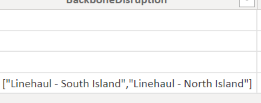
How do I remove special characters from a text in a column? Can I do it by using 'Replace values' or do I have to create a custom column? I tried using replace values [""] with blank but that didn't work. 

Appreciate any help

Screenshot 2022-05-12 175503.png

2 ACCEPTED SOLUTIONS
PhilipTreacy
Super User
Super User

Hi @Anonymous 


If you want to remove [""] then you need to treat these as different characters if they appear in a string as shown in your image.


So do Replace values 3 times, once for each character.


Regards


Phil


Did I answer your question? Then please mark my post as the solution.
If I helped you, click on the Thumbs Up to give Kudos.


Blog :: YouTube Channel :: Connect on Linkedin


Proud to be a Super User!


View solution in original post

Great.....Just a single statement is needed. No need to do replacement 3 times. In below, replace Source with your previous step and Data with your column name.

= Table.ReplaceValue(Source,each [Data],each Text.Remove([Data],{"[","]",""""}),Replacer.ReplaceValue,{"Data"})

View solution in original post

5 REPLIES 5
Vijay_A_Verma
Super User
Super User

What is the result expected from the replacement which you want to make? Do you want to replace only quotes, brackets or also comma and -?

PhilipTreacy
Super User
Super User

Hi @Anonymous 


If you want to remove [""] then you need to treat these as different characters if they appear in a string as shown in your image.


So do Replace values 3 times, once for each character.


Regards


Phil


Did I answer your question? Then please mark my post as the solution.
If I helped you, click on the Thumbs Up to give Kudos.


Blog :: YouTube Channel :: Connect on Linkedin


Proud to be a Super User!


Anonymous
Not applicable

@PhilipTreacy perfect, that worked. Many thanks.

@Vijay_A_Verma - issue fixed

Great.....Just a single statement is needed. No need to do replacement 3 times. In below, replace Source with your previous step and Data with your column name.

= Table.ReplaceValue(Source,each [Data],each Text.Remove([Data],{"[","]",""""}),Replacer.ReplaceValue,{"Data"})
Anonymous
Not applicable

@Vijay_A_Verma even better, thanks for that. Appreciate it:)

Helpful resources

Announcements
Power BI DataViz World Championships

Power BI Dataviz World Championships

The Power BI Data Visualization World Championships is back! Get ahead of the game and start preparing now!

December 2025 Power BI Update Carousel

Power BI Monthly Update - December 2025

Check out the December 2025 Power BI Holiday Recap!

FabCon Atlanta 2026 carousel

FabCon Atlanta 2026

Join us at FabCon Atlanta, March 16-20, for the ultimate Fabric, Power BI, AI and SQL community-led event. Save $200 with code FABCOMM.

Top Solution Authors