This time we’re going bigger than ever. Fabric, Power BI, SQL, AI and more. We're covering it all. You won't want to miss it.
Learn moreLevel up your Power BI skills this month - build one visual each week and tell better stories with data! Get started
How do I remove special characters from a text in a column? Can I do it by using 'Replace values' or do I have to create a custom column? I tried using replace values [""] with blank but that didn't work.
Appreciate any help
Solved! Go to Solution.
Hi @Anonymous
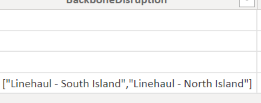
If you want to remove [""] then you need to treat these as different characters if they appear in a string as shown in your image.
So do Replace values 3 times, once for each character.
Regards
Phil
Proud to be a Super User!
Great.....Just a single statement is needed. No need to do replacement 3 times. In below, replace Source with your previous step and Data with your column name.
= Table.ReplaceValue(Source,each [Data],each Text.Remove([Data],{"[","]",""""}),Replacer.ReplaceValue,{"Data"})
What is the result expected from the replacement which you want to make? Do you want to replace only quotes, brackets or also comma and -?
Hi @Anonymous
If you want to remove [""] then you need to treat these as different characters if they appear in a string as shown in your image.
So do Replace values 3 times, once for each character.
Regards
Phil
Proud to be a Super User!
Great.....Just a single statement is needed. No need to do replacement 3 times. In below, replace Source with your previous step and Data with your column name.
= Table.ReplaceValue(Source,each [Data],each Text.Remove([Data],{"[","]",""""}),Replacer.ReplaceValue,{"Data"})
Check out the April 2026 Power BI update to learn about new features.
Sign up to receive a private message when registration opens and key events begin.
If you have recently started exploring Fabric, we'd love to hear how it's going. Your feedback can help with product improvements.