cancel
Showing results for 
Search instead for 
Did you mean: 

Vote for your favorite vizzies from the Power BI Dataviz World Championship submissions. Vote now!

Reply
Anonymous
Not applicable

How to refer to the column name in an IF formula in PQ

Hallo all,


I need to refer to and then use the column name in an IF statement.


For example, in a new column, called Category, I want to say:


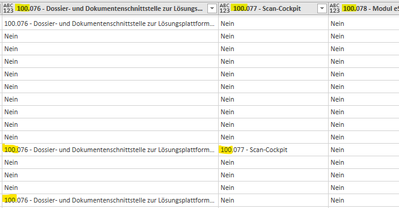
if any of columns start with 100. and the value within the columns also begins with 100. then "Sales Cat A" else if any of the columns start with 200. and the value within the columns also begins with 200. then "Sales Cat B" else if....


Nigel_Mayhew_0-1635481990210.png


I know how to construct the IF statement itself, but I need help please with referring to the columns names/headers within the formula.


Is this possible?


Cheers.  

1 ACCEPTED SOLUTION
wdx223_Daniel
Community Champion
Community Champion

NewStep=Table.AddColumn(PreviousStepName,"Category",each List.Skip({{"100.","Sales Cat A"},{"200.","Sales Cat B"},{"300.","Sales Cat C"}},(x)=>Table.IsEmpty(Table.SelectRows(Record.ToTable(_),each Text.StartsWith([Name],x{0}) and Text.StartsWith([Value],x{0})))){0}?{1}? ??"Other Cat")

View solution in original post

2 REPLIES 2
wdx223_Daniel
Community Champion
Community Champion

NewStep=Table.AddColumn(PreviousStepName,"Category",each List.Skip({{"100.","Sales Cat A"},{"200.","Sales Cat B"},{"300.","Sales Cat C"}},(x)=>Table.IsEmpty(Table.SelectRows(Record.ToTable(_),each Text.StartsWith([Name],x{0}) and Text.StartsWith([Value],x{0})))){0}?{1}? ??"Other Cat")

Anonymous
Not applicable

Absolute magic...worked perfectly....thanks Daniel!

Helpful resources

Announcements
Power BI DataViz World Championships

Power BI Dataviz World Championships

Vote for your favorite vizzies from the Power BI World Championship submissions!

Sticker Challenge 2026 Carousel

Join our Community Sticker Challenge 2026

If you love stickers, then you will definitely want to check out our Community Sticker Challenge!

January Power BI Update Carousel

Power BI Monthly Update - January 2026

Check out the January 2026 Power BI update to learn about new features.

FabCon Atlanta 2026 carousel

FabCon Atlanta 2026

Join us at FabCon Atlanta, March 16-20, for the ultimate Fabric, Power BI, AI and SQL community-led event. Save $200 with code FABCOMM.