cancel
Showing results for 
Search instead for 
Did you mean: 

The Power BI Data Visualization World Championships is back! Get ahead of the game and start preparing now! Learn more

Reply
Anonymous
Not applicable

How to insert Dynamic parameter to script

Hello everyone,

I have a script which fetches up data from an SQL server(particular table). The are plenty of projects on the server, so I want to make the project id "dynamic". 

I have created one dynamic parameter, which is text.

Could you please assist me on how should I insert it to script.

I have  tried "&projectid"(described in attached photo), but I get error that "incorrect syntax near &"


yusif1999_0-1655828480392.png


1 ACCEPTED SOLUTION
artpil
Resolver II
Resolver II

Hi, by parameter i ment a variable part of a query. Just create empty query and in the formula bar enter project id. This query will be your parameter to be used in building sql statement.

Artur

View solution in original post

4 REPLIES 4
artpil
Resolver II
Resolver II

Hi, by parameter i ment a variable part of a query. Just create empty query and in the formula bar enter project id. This query will be your parameter to be used in building sql statement.

Artur

Anonymous
Not applicable

Thank you very much. I have just entered parameter as '"&projectid&"'(as you did) and it worked

artpil
Resolver II
Resolver II

Hi,


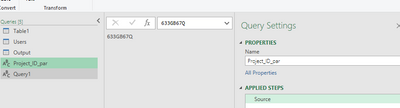
Create query and call it e.g. Project_ID_par

artpil_0-1655830678397.png


Create query and in the first step create query text by using name of first query as parameter and in the second step connect to the databse and execute query.

let
    Source = "select 8 from table_name wherer project_id='" & Project_ID_par & "'",
    Custom1 = Odbc.Query("dsn=DSNName", Source)
in
    Custom1

Hope this will help.

Artur

Anonymous
Not applicable

Hello Artur,


Thanks for your detailed explanation.

If I understood correctly, I have to create 2 queries and 2nd one should point to the first one.

I have tried to create query from "manage parameters => new parameter".

However, the query field is disabled.

yusif1999_0-1655890693471.png


Helpful resources

Announcements
Power BI DataViz World Championships

Power BI Dataviz World Championships

The Power BI Data Visualization World Championships is back! Get ahead of the game and start preparing now!

December 2025 Power BI Update Carousel

Power BI Monthly Update - December 2025

Check out the December 2025 Power BI Holiday Recap!

FabCon Atlanta 2026 carousel

FabCon Atlanta 2026

Join us at FabCon Atlanta, March 16-20, for the ultimate Fabric, Power BI, AI and SQL community-led event. Save $200 with code FABCOMM.