cancel
Showing results for 
Search instead for 
Did you mean: 

Vote for your favorite vizzies from the Power BI Dataviz World Championship submissions. Vote now!

Reply
Anonymous
Not applicable

How to find specific data in conditional column

Heya! Apologies for my lack of terminology I'm new to this app - I am having trouble with getting data from a column, Im trying to just get a specific bit of data from a line entry. So for example, there is a column and each line contains a whole number such as 12345 amongst the words. I want to bring just this data over to its own column - I have tried using conditional column by clicking 'contains' and writign in the information I want to pull, but it pulls in the entire line not just the whole number. Is there a way to tell Power BI to pull JUST the number from the line? Example:


1. Invoice 123456 for John Doe

2. Invoice 1234567 for John Doe

3. Invoice 12345678 for John Doe


Entering 123456 for exmaple, still seems to pull the entire line in not just the number.


Thanks 🙂 

1 ACCEPTED SOLUTION
camargos88
Community Champion
Community Champion

Hi @Anonymous ,


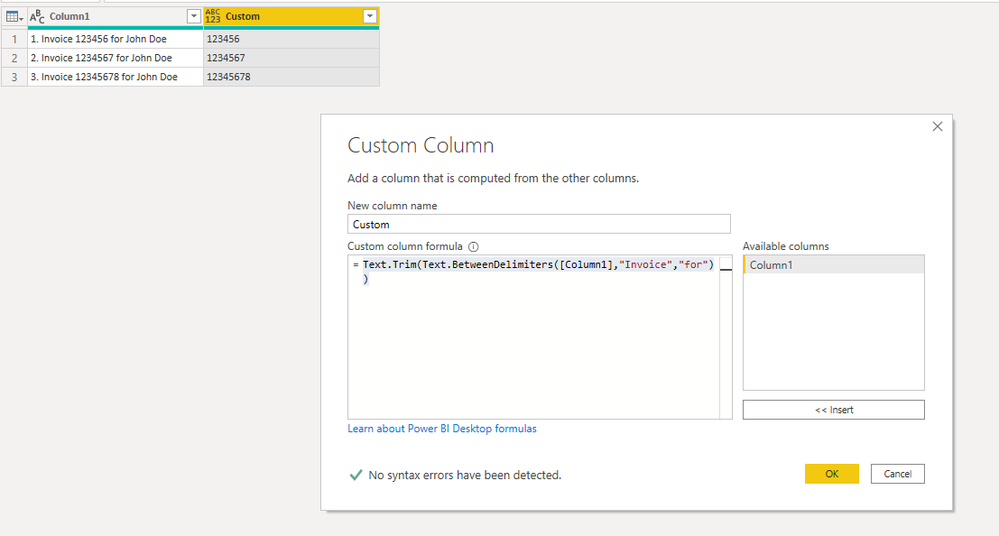
You can use it for a custom column:

Text.Trim(Text.BetweenDelimiters([Column1],"Invoice","for"))


Capture.PNG


This also works:

Text.Select(Text.Range([Column1], 2, Text.Length([Column1]) - 2), {"0".."9"})


It removes the number followed by dot and select only the numbers.


Did I answer your question? Mark my post as a solution!

Proud to be a Super User!


View solution in original post

1 REPLY 1
camargos88
Community Champion
Community Champion

Hi @Anonymous ,


You can use it for a custom column:

Text.Trim(Text.BetweenDelimiters([Column1],"Invoice","for"))


Capture.PNG


This also works:

Text.Select(Text.Range([Column1], 2, Text.Length([Column1]) - 2), {"0".."9"})


It removes the number followed by dot and select only the numbers.


Did I answer your question? Mark my post as a solution!

Proud to be a Super User!


Helpful resources

Announcements
Power BI DataViz World Championships

Power BI Dataviz World Championships

Vote for your favorite vizzies from the Power BI World Championship submissions!

Sticker Challenge 2026 Carousel

Join our Community Sticker Challenge 2026

If you love stickers, then you will definitely want to check out our Community Sticker Challenge!

January Power BI Update Carousel

Power BI Monthly Update - January 2026

Check out the January 2026 Power BI update to learn about new features.

FabCon Atlanta 2026 carousel

FabCon Atlanta 2026

Join us at FabCon Atlanta, March 16-20, for the ultimate Fabric, Power BI, AI and SQL community-led event. Save $200 with code FABCOMM.