This is best Fabric, Power BI, SQL and AI community event. How do we know? The last event sold out! Save €200 with code FABCMTY200.
Register nowA new Data Days event is coming soon! This time we’re going bigger than ever. Fabric, Power BI, SQL, AI and more. Don't miss out.
Hi,
I am new to this power bi. Can someone please tell me how to connect the Azure Devops REST API into the power bi.
The API I am trying to connect is "https://vsrm.dev.azure.com/****/_apis/release/definitions?api-version=5.1".
Thanks & Regards,
Sujeesh
Solved! Go to Solution.
Oh, that isn't zip I think. It should be JSON. Just apply the line I gave in the previous post of the zip function. The zip function is useful if you want to download a bunch of files out of git. I did this myself once to do a git blame summary
This is what your query should look like:
let
Source = VSTS.Contents("https://vsrm.dev.azure.com/fe-tfs/_apis/release/definitions?api-version=5.1"),
#"Imported JSON" = Table.FromRecords(Json.Document(Source,65001)[value])
in
#"Imported JSON"
Thank you my friend. It worked😀
Hi Sujeesh,
I am also facing a similar kind of issue. I believe it's a syntax error.
Expression.syntaxError: Token Eof expected
= VSTS.Contents("https://dev.azure.com/****/*****/***** Pod/_apis/work/teamsettings/iterations/*******/capacities?api-version=6.0"),
#"Import Json" = Table.FromRecords(Json.Document(Source,65001)[value])
In
#"Import Json"
= VSTS.Contents(<your url>)
Thank you for clarifying my doubts. It worked
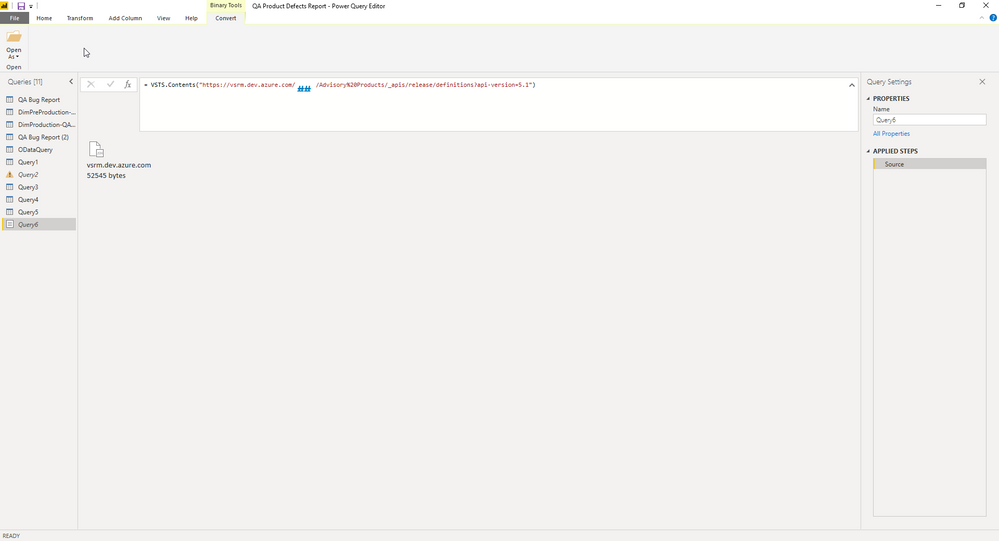
I got the result as a JSON file. Can you tell me how to convert this JSON file as a table so that I can use this data in my chart
Please find the screenshot
Add this line as your next step:
= Table.FromRecords(Json.Document(Source,65001)[value])
Check out the May 2026 Power BI update to learn about new features.
Sign up to receive a private message when registration opens and key events begin.
If you have recently started exploring Fabric, we'd love to hear how it's going. Your feedback can help with product improvements.