cancel
Showing results for 
Search instead for 
Did you mean: 

We've captured the moments from FabCon & SQLCon that everyone is talking about, and we are bringing them to the community, live and on-demand. Starts on April 14th. Register now

Reply
Anonymous
Not applicable

How to conditionally update fields in one column, based upon data in another column.

I'm trying to find a way thru query to update a date field in one column, based upon the conditional value of another column.  Is there a way to do this?


Here is a simple example.

RecordCreated DateWork ID
A4/1/202012345
B4/15/202023456
C6/20/2020

34567

D5/10/202045678
E12/25/202056789


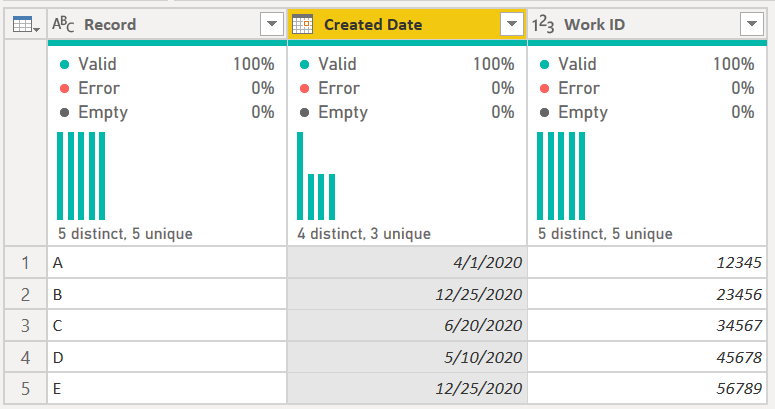
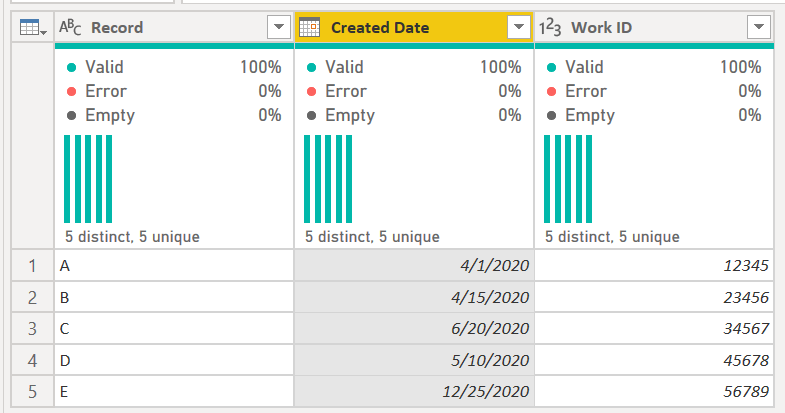
I'm trying to use query to conditionally change the "Created Date" based upon the value of "Work Type".  I'd like to craft a query such that If "Work ID = 23456" then replace "Created Date" with the "Created Date" for "Work ID 56789".  So when finished, record B would have a Created Date of 12/25/20.


I'm having trouble crafting anything that works using Table.ReplaceValue that also contains my conditional logic.  Is there a better way?

1 ACCEPTED SOLUTION
CNENFRNL
Community Champion
Community Champion

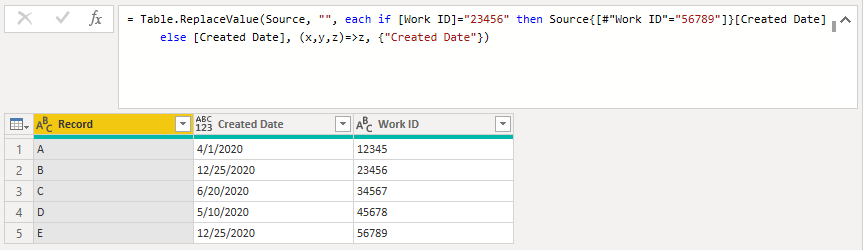
@Anonymous , Table.ReplaceValue, as well as Table.ReplaceText, is one of the most powerful function in M language which one could imagine; it does the trick for your request with ease. You might want to try

let
    Source = Table.FromRows(Json.Document(Binary.Decompress(Binary.FromText("PcxBDoAwCATAv3BuQsFS9ajVVxD+/w0B0952d5JVhQsKNCTkytUj8dYErCjcP8iUgJ4yvHWfpwTsKY83QVoScKS8+Y287kJOMPsA", BinaryEncoding.Base64), Compression.Deflate)), let _t = ((type nullable text) meta [Serialized.Text = true]) in type table [Record = _t, #"Created Date" = _t, #"Work ID" = _t]),

    Custom1 = Table.ReplaceValue(Source, "", each if [Work ID]="23456" then Source{[#"Work ID"="56789"]}[Created Date] else [Created Date], (x,y,z)=>z, {"Created Date"})
in
    Custom1

Screenshot 2021-03-02 095841.png


Thanks to the great efforts by MS engineers to simplify syntax of DAX! Most beginners are SUCCESSFULLY MISLED to think that they could easily master DAX; but it turns out that the intricacy of the most frequently used RANKX() is still way beyond their comprehension!

DAX is simple, but NOT EASY!

View solution in original post

3 REPLIES 3
Mertubo
New Member

there are not only good answers but especially good questions 😉

CNENFRNL
Community Champion
Community Champion

@Anonymous , Table.ReplaceValue, as well as Table.ReplaceText, is one of the most powerful function in M language which one could imagine; it does the trick for your request with ease. You might want to try

let
    Source = Table.FromRows(Json.Document(Binary.Decompress(Binary.FromText("PcxBDoAwCATAv3BuQsFS9ajVVxD+/w0B0952d5JVhQsKNCTkytUj8dYErCjcP8iUgJ4yvHWfpwTsKY83QVoScKS8+Y287kJOMPsA", BinaryEncoding.Base64), Compression.Deflate)), let _t = ((type nullable text) meta [Serialized.Text = true]) in type table [Record = _t, #"Created Date" = _t, #"Work ID" = _t]),

    Custom1 = Table.ReplaceValue(Source, "", each if [Work ID]="23456" then Source{[#"Work ID"="56789"]}[Created Date] else [Created Date], (x,y,z)=>z, {"Created Date"})
in
    Custom1

Screenshot 2021-03-02 095841.png


Thanks to the great efforts by MS engineers to simplify syntax of DAX! Most beginners are SUCCESSFULLY MISLED to think that they could easily master DAX; but it turns out that the intricacy of the most frequently used RANKX() is still way beyond their comprehension!

DAX is simple, but NOT EASY!

edhans
Community Champion
Community Champion

There is no basic code to do this @Anonymous. It is possible but would involve much more complex code and may have performance considerations.


Even a simpler way may have performance issues. It depends on your data set. The best way is to have a new table that will do the cross reference for you. But if this is a one off, then this works. This is untennable with multiple date changes based on many different work IDs.

This
edhans_0-1614646817979.png

becomes this:

edhans_1-1614646838729.png

let
    Source = Table.FromRows(Json.Document(Binary.Decompress(Binary.FromText("PcxBDoAwCATAv3BuQsFS9ajVVxD+/w0B0952d5JVhQsKNCTkytUj8dYErCjcP8iUgJ4yvHWfpwTsKY83QVoScKS8+Y287kJOMPsA", BinaryEncoding.Base64), Compression.Deflate)), let _t = ((type nullable text) meta [Serialized.Text = true]) in type table [Record = _t, #"Created Date" = _t, #"Work ID" = _t]),
    #"Changed Type" = Table.TransformColumnTypes(Source,{{"Work ID", Int64.Type}, {"Created Date", type date}}),
    NewCreatedDate = 
        Table.AddColumn(
            #"Changed Type",
            "New Created Date",
            each if [Work ID] = 23456 then Table.SelectRows(Table.Buffer(#"Changed Type"), each [Work ID] = 56789)[Created Date]{0}
            else [Created Date],
            Date.Type
        ),
    #"Removed Other Columns" = Table.SelectColumns(NewCreatedDate,{"Record", "New Created Date", "Work ID"}),
    #"Renamed Columns" = Table.RenameColumns(#"Removed Other Columns",{{"New Created Date", "Created Date"}})
in
    #"Renamed Columns"


How to use M code provided in a blank query:
1) In Power Query, select New Source, then Blank Query
2) On the Home ribbon, select "Advanced Editor" button
3) Remove everything you see, then paste the M code I've given you in that box.
4) Press Done
5) See this article if you need help using this M code in your model.


Did I answer your question? Mark my post as a solution!
Did my answers help arrive at a solution? Give it a kudos by clicking the Thumbs Up!

DAX is for Analysis. Power Query is for Data Modeling


Proud to be a Super User!

MCSA: BI Reporting

Helpful resources

Announcements
New to Fabric survey Carousel

New to Fabric Survey

If you have recently started exploring Fabric, we'd love to hear how it's going. Your feedback can help with product improvements.

Power BI DataViz World Championships carousel

Power BI DataViz World Championships - June 2026

A new Power BI DataViz World Championship is coming this June! Don't miss out on submitting your entry.

Join our Fabric User Panel

Join our Fabric User Panel

Share feedback directly with Fabric product managers, participate in targeted research studies and influence the Fabric roadmap.

March Power BI Update Carousel

Power BI Community Update - March 2026

Check out the March 2026 Power BI update to learn about new features.