cancel
Showing results for 
Search instead for 
Did you mean: 

The Power BI Data Visualization World Championships is back! Get ahead of the game and start preparing now! Learn more

Reply
Anonymous
Not applicable

How to compare two columns and return data from a third column?

Hi Community,


Example data set in Power Query

HoursProject CatagoryProduction CatagoryInternal (formula)External (formula)
3Men'sMen's

3

null
5Women'sWomen's5null
6Kid'sKid's6null
2Men'sFamilynull2
4FamilyMen'snull4
1Women'sWomen's1null


What I need to do

To compare the values between the "Project Category" and the "Production Category".

If it's a match, get the value from the "Hours" column and put it in the "Internal" column. If not, put the hours into the "External" column.


The question

Is there a Power Query formula or function that can do this? Maybe I could work out the "Internal" column and apply the same method to the "External" column?


Many thanks!

1 ACCEPTED SOLUTION
v-yalanwu-msft
Community Support
Community Support

Hi, @Anonymous ;

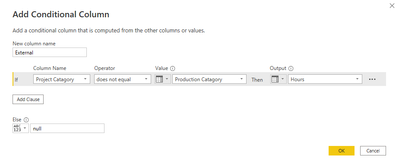
You could add conditional column as follow:
vyalanwumsft_0-1669258008219.png

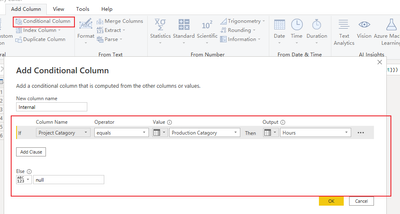
Then add another conditional column.

vyalanwumsft_1-1669258080368.png

The final show:

vyalanwumsft_2-1669258098242.png

let
    Source = Table.FromRows(Json.Document(Binary.Decompress(Binary.FromText("i45WMlbSUfJNzYspNTAwMi9G5cTqRCuZAoXC83ORVaBwQWrMgILemSkIFUgckLwRuh1uibmZOZVgORMEF8NuQ0J2xwIA", BinaryEncoding.Base64), Compression.Deflate)), let _t = ((type nullable text) meta [Serialized.Text = true]) in type table [Hours = _t, #"Project Catagory" = _t, #"Production Catagory" = _t]),
    #"Changed Type" = Table.TransformColumnTypes(Source,{{"Hours", Int64.Type}, {"Project Catagory", type text}, {"Production Catagory", type text}}),
    #"Added Conditional Column" = Table.AddColumn(#"Changed Type", "Internal", each if [Project Catagory] = [Production Catagory] then [Hours] else null),
    #"Added Conditional Column1" = Table.AddColumn(#"Added Conditional Column", "External", each if [Project Catagory] <> [Production Catagory] then [Hours] else null)
in
    #"Added Conditional Column1"


Best Regards,
Community Support Team _ Yalan Wu
If this post helps, then please consider Accept it as the solution to help the other members find it more quickly.

View solution in original post

2 REPLIES 2
v-yalanwu-msft
Community Support
Community Support

Hi, @Anonymous ;

You could add conditional column as follow:

vyalanwumsft_0-1669258008219.png

Then add another conditional column.

vyalanwumsft_1-1669258080368.png

The final show:

vyalanwumsft_2-1669258098242.png

let
    Source = Table.FromRows(Json.Document(Binary.Decompress(Binary.FromText("i45WMlbSUfJNzYspNTAwMi9G5cTqRCuZAoXC83ORVaBwQWrMgILemSkIFUgckLwRuh1uibmZOZVgORMEF8NuQ0J2xwIA", BinaryEncoding.Base64), Compression.Deflate)), let _t = ((type nullable text) meta [Serialized.Text = true]) in type table [Hours = _t, #"Project Catagory" = _t, #"Production Catagory" = _t]),
    #"Changed Type" = Table.TransformColumnTypes(Source,{{"Hours", Int64.Type}, {"Project Catagory", type text}, {"Production Catagory", type text}}),
    #"Added Conditional Column" = Table.AddColumn(#"Changed Type", "Internal", each if [Project Catagory] = [Production Catagory] then [Hours] else null),
    #"Added Conditional Column1" = Table.AddColumn(#"Added Conditional Column", "External", each if [Project Catagory] <> [Production Catagory] then [Hours] else null)
in
    #"Added Conditional Column1"


Best Regards,
Community Support Team _ Yalan Wu
If this post helps, then please consider Accept it as the solution to help the other members find it more quickly.

HotChilli
Community Champion
Community Champion

It's fairly straightforward.  Add a custom column using :

if   then  else      

You just use the names of the columns to compare the 2 columns required and put the desired result and an alternative

--

So you'll need to 2 custom columns

Helpful resources

Announcements
Power BI DataViz World Championships

Power BI Dataviz World Championships

The Power BI Data Visualization World Championships is back! Get ahead of the game and start preparing now!

December 2025 Power BI Update Carousel

Power BI Monthly Update - December 2025

Check out the December 2025 Power BI Holiday Recap!

FabCon Atlanta 2026 carousel

FabCon Atlanta 2026

Join us at FabCon Atlanta, March 16-20, for the ultimate Fabric, Power BI, AI and SQL community-led event. Save $200 with code FABCOMM.