cancel
Showing results for 
Search instead for 
Did you mean: 

We've captured the moments from FabCon & SQLCon that everyone is talking about, and we are bringing them to the community, live and on-demand. Starts on April 14th. Register now

Reply
Cornwalls
Helper I
Helper I

How to - Percentage Alert

Hi Everyone,


First time posting so go easy on me.


I am looking for a way to achieve the below result that Columns A+B+C+D=E


But if Column E is greater than 80% of Column F, it will be formatted Red.


Stored Red ApplesStored Blue ApplesShipped Red ApplesShipped Blue ApplesTotal ApplesLimit
1114710
1115810


Hope this makes sense.....

2 ACCEPTED SOLUTIONS
HotChilli
Community Champion
Community Champion

Welcome.

Should really be in Desktop forum. (just advice)


You'll need to add the values of course (can do this in Power Query or DAX).

You need a column or measure to work out the percentage, then apply conditional formatting on the ApplesTotal value.

A couple of links:

https://radacad.com/show-me-the-biggest-number-conditional-formatting-in-power-bi 


https://community.powerbi.com/t5/Desktop/Conditional-Formatting-based-on-calculated-measure/td-p/640... 


View solution in original post

dax
Community Support
Community Support

Hi @Cornwalls , 

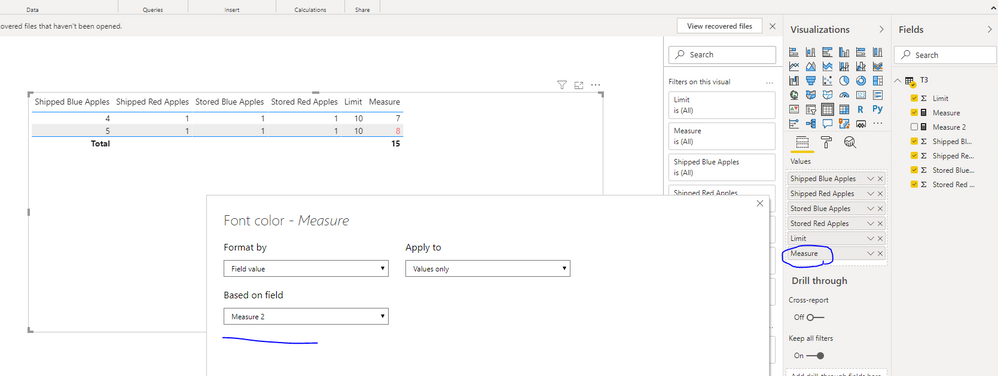
As @HotChilli  mentioned, you could try to use column or measure and set conditional formmating on it to achieve this goal.

759.PNG

 You could refer to my sample for details.

Best Regards,
Zoe Zhi

If this post helps, then please consider Accept it as the solution to help the other members find it more quickly.

View solution in original post

2 REPLIES 2
dax
Community Support
Community Support

Hi @Cornwalls , 

As @HotChilli  mentioned, you could try to use column or measure and set conditional formmating on it to achieve this goal.

759.PNG

 You could refer to my sample for details.

Best Regards,
Zoe Zhi

If this post helps, then please consider Accept it as the solution to help the other members find it more quickly.

HotChilli
Community Champion
Community Champion

Welcome.

Should really be in Desktop forum. (just advice)


You'll need to add the values of course (can do this in Power Query or DAX).

You need a column or measure to work out the percentage, then apply conditional formatting on the ApplesTotal value.

A couple of links:

https://radacad.com/show-me-the-biggest-number-conditional-formatting-in-power-bi 


https://community.powerbi.com/t5/Desktop/Conditional-Formatting-based-on-calculated-measure/td-p/640... 


Helpful resources

Announcements
New to Fabric survey Carousel

New to Fabric Survey

If you have recently started exploring Fabric, we'd love to hear how it's going. Your feedback can help with product improvements.

Power BI DataViz World Championships carousel

Power BI DataViz World Championships - June 2026

A new Power BI DataViz World Championship is coming this June! Don't miss out on submitting your entry.

Join our Fabric User Panel

Join our Fabric User Panel

Share feedback directly with Fabric product managers, participate in targeted research studies and influence the Fabric roadmap.

March Power BI Update Carousel

Power BI Community Update - March 2026

Check out the March 2026 Power BI update to learn about new features.