cancel
Showing results for 
Search instead for 
Did you mean: 

The Power BI Data Visualization World Championships is back! Get ahead of the game and start preparing now! Learn more

Reply
Cornwalls
Helper I
Helper I

How to - Percentage Alert

Hi Everyone,


First time posting so go easy on me.


I am looking for a way to achieve the below result that Columns A+B+C+D=E


But if Column E is greater than 80% of Column F, it will be formatted Red.


Stored Red ApplesStored Blue ApplesShipped Red ApplesShipped Blue ApplesTotal ApplesLimit
1114710
1115810


Hope this makes sense.....

2 ACCEPTED SOLUTIONS
HotChilli
Super User
Super User

Welcome.

Should really be in Desktop forum. (just advice)


You'll need to add the values of course (can do this in Power Query or DAX).

You need a column or measure to work out the percentage, then apply conditional formatting on the ApplesTotal value.

A couple of links:

https://radacad.com/show-me-the-biggest-number-conditional-formatting-in-power-bi 


https://community.powerbi.com/t5/Desktop/Conditional-Formatting-based-on-calculated-measure/td-p/640... 


View solution in original post

dax
Community Support
Community Support

Hi @Cornwalls , 

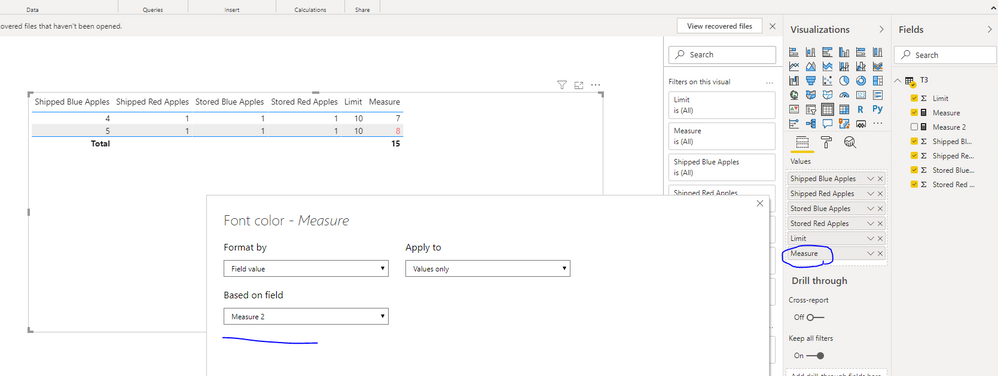
As @HotChilli  mentioned, you could try to use column or measure and set conditional formmating on it to achieve this goal.

759.PNG

 You could refer to my sample for details.

Best Regards,
Zoe Zhi

If this post helps, then please consider Accept it as the solution to help the other members find it more quickly.

View solution in original post

2 REPLIES 2
dax
Community Support
Community Support

Hi @Cornwalls , 

As @HotChilli  mentioned, you could try to use column or measure and set conditional formmating on it to achieve this goal.

759.PNG

 You could refer to my sample for details.

Best Regards,
Zoe Zhi

If this post helps, then please consider Accept it as the solution to help the other members find it more quickly.

HotChilli
Super User
Super User

Welcome.

Should really be in Desktop forum. (just advice)


You'll need to add the values of course (can do this in Power Query or DAX).

You need a column or measure to work out the percentage, then apply conditional formatting on the ApplesTotal value.

A couple of links:

https://radacad.com/show-me-the-biggest-number-conditional-formatting-in-power-bi 


https://community.powerbi.com/t5/Desktop/Conditional-Formatting-based-on-calculated-measure/td-p/640... 


Helpful resources

Announcements
Power BI DataViz World Championships

Power BI Dataviz World Championships

The Power BI Data Visualization World Championships is back! Get ahead of the game and start preparing now!

December 2025 Power BI Update Carousel

Power BI Monthly Update - December 2025

Check out the December 2025 Power BI Holiday Recap!

FabCon Atlanta 2026 carousel

FabCon Atlanta 2026

Join us at FabCon Atlanta, March 16-20, for the ultimate Fabric, Power BI, AI and SQL community-led event. Save $200 with code FABCOMM.