cancel
Showing results for 
Search instead for 
Did you mean: 

Get Fabric certified for FREE! Don't miss your chance! Learn more

Reply
Anonymous
Not applicable

How to Filter Columns from a binary

Hi guys, need some help on this

I have imported data source from a folder containing 2 excel workbooks.  So far it has been working well until the last step which is to filter to keep the columns that do not contain the word yearly. Just would like to check if im writing it correctly when importing folders instead of from a workbook. 


let
    Source = Folder.Files("C:\Users\achia\OneDrive - Lenovo\Desktop\Lenovo\Payroll\Data Cleansing"),
    #"Added Custom" = Table.AddColumn(Source, "Custom", each Excel.Workbook([Content])),
    #"Expanded Custom1" = Table.ExpandTableColumn(#"Added Custom", "Custom", {"Name", "Data", "Item", "Kind", "Hidden"}, {"Name.1", "Data", "Item", "Kind", "Hidden"}),
    #"Added Custom1" = Table.AddColumn(#"Expanded Custom1", "Custom", each Table.SelectColumns([Data],{"Column2","Column3","Column4"})),
    #"Added Custom2" = Table.AddColumn(#"Added Custom1", "Custom.1", each Table.RemoveFirstN([Custom],9)),
    #"Added Custom3" = Table.AddColumn(#"Added Custom2", "Custom.2", each Table.RemoveLastN([Custom.1],17)),
    #"Filter Rows" = Table.AddColumn(#"Added Custom3", "Custom.3", each Table.SelectRows([Custom.2], [Column4] <> "Yearly"))
in
    #"Filter Rows"


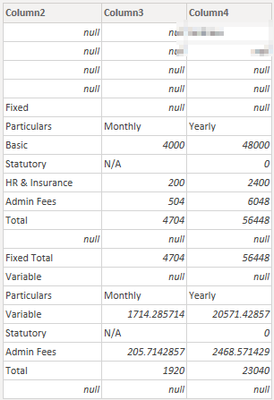
Table View
Example 1 of workbook

adrianchy_0-1654065930370.png

Thanks

1 ACCEPTED SOLUTION
Vijay_A_Verma
Most Valuable Professional

each keyword is missing. Use below Table.SelectRows

Table.SelectRows([Custom.2], each [Column4] <> "Yearly")


View solution in original post

2 REPLIES 2
wdx223_Daniel
Community Champion
Community Champion

let
    Source = Folder.Files("C:\Users\achia\OneDrive - Lenovo\Desktop\Lenovo\Payroll\Data Cleansing"),
    Custom1=#table(
                   3,
                   List.TransformMany(
                                      Source[Content],
                                      each List.TransformMany(
                                                              Excel.Workbook(_)[Data],
                                                              each Table.ToRows(
Table.SelectRows(Table.RemoveLastN(Table.Skip([[Column2],[Column3],[Column4]],9),17),each not Text.StartsWith(Text.From([Column4]??""),"Yearly"))),
                                                             (x,y)=>y),
                                      (x,y)=>y
                                      )
                   )
in
    Custom1
Vijay_A_Verma
Most Valuable Professional

each keyword is missing. Use below Table.SelectRows

Table.SelectRows([Custom.2], each [Column4] <> "Yearly")


Helpful resources

Announcements
Join our Fabric User Panel

Join our Fabric User Panel

Share feedback directly with Fabric product managers, participate in targeted research studies and influence the Fabric roadmap.

Sticker Challenge 2026 Carousel

Join our Community Sticker Challenge 2026

If you love stickers, then you will definitely want to check out our Community Sticker Challenge!

January Power BI Update Carousel

Power BI Monthly Update - January 2026

Check out the January 2026 Power BI update to learn about new features.

FabCon Atlanta 2026 carousel

FabCon Atlanta 2026

Join us at FabCon Atlanta, March 16-20, for the ultimate Fabric, Power BI, AI and SQL community-led event. Save $200 with code FABCOMM.