Hi guys, need some help on this
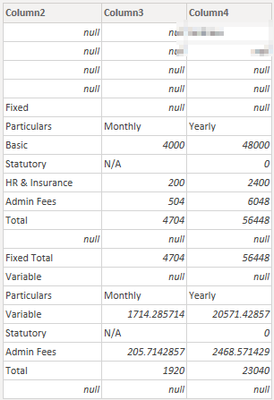
I have imported data source from a folder containing 2 excel workbooks. So far it has been working well until the last step which is to filter to keep the columns that do not contain the word yearly. Just would like to check if im writing it correctly when importing folders instead of from a workbook.
let
    Source = Folder.Files("C:\Users\achia\OneDrive - Lenovo\Desktop\Lenovo\Payroll\Data Cleansing"),
    #"Added Custom" = Table.AddColumn(Source, "Custom", each Excel.Workbook([Content])),
    #"Expanded Custom1" = Table.ExpandTableColumn(#"Added Custom", "Custom", {"Name", "Data", "Item", "Kind", "Hidden"}, {"Name.1", "Data", "Item", "Kind", "Hidden"}),
    #"Added Custom1" = Table.AddColumn(#"Expanded Custom1", "Custom", each Table.SelectColumns([Data],{"Column2","Column3","Column4"})),
    #"Added Custom2" = Table.AddColumn(#"Added Custom1", "Custom.1", each Table.RemoveFirstN([Custom],9)),
    #"Added Custom3" = Table.AddColumn(#"Added Custom2", "Custom.2", each Table.RemoveLastN([Custom.1],17)),
    #"Filter Rows" = Table.AddColumn(#"Added Custom3", "Custom.3", each Table.SelectRows([Custom.2], [Column4] <> "Yearly"))
in
    #"Filter Rows"
Table View
Example 1 of workbook
Thanks


