cancel
Showing results for 
Search instead for 
Did you mean: 

The Power BI Data Visualization World Championships is back! Get ahead of the game and start preparing now! Learn more

Reply
mmace1
Impactful Individual

How do you guys pull in Zendesk data?

How do you guys pull in Zendesk data? 


Below are some of the ways I've found, but none (seem) great.  Let me know if I have misconception(s):


  • Get Data  > Zendesk connects, but is incredibly slow. 
  • Using the Zendesk App works, but that just gives preset visuals.  Not the raw data that can then be combined with other data sources /  interpreted via measures. 
  • Create custom reports in Zendesk, then manually export those to files - connect to the files.  Manual steps aren't good. 
  • Use the API to pull Zendesk data into a data warehouse, then connect Power BI to that warehouse.  Bit beyond my current abilities, and we don't really have available staff to implement that
  • Outsourcing the API/Warehouse to something like Stich.  Seems viable, just...we pull in a lot of data to Power BI, this is the first source that we'd be using an external service / all this hassle for. 


Compared to our other data sources (relatively easy to connect to and import from)- all these options kind of suck.  


How do you pull in Zendesk data? 


1 ACCEPTED SOLUTION
Anonymous
Not applicable

@mmace1,

You can connect to Zendesk.pbit in Power BI Desktop and combine other data sources in same PBIX file.


Reagrds,
Lydia

View solution in original post

6 REPLIES 6

Hello @mmace1 

We're developers of Power BI Connector https://www.zendesk.com/marketplace/apps/support/834457/power-bi-connector-by-alpha-serve/ it allows you to connect Zendesk to Power BI in less than 5 minutes. You may try it for free. Let us know if you need any assistance.

Cheers,

Anton

Anonymous
Not applicable

I have started a post compiling Power Query code for a custom connector to zendesk. https://community.powerbi.com/t5/Desktop/Custom-Zendesk-Connector-Power-Query-Code/td-p/2407620

drinko
Helper I
Helper I

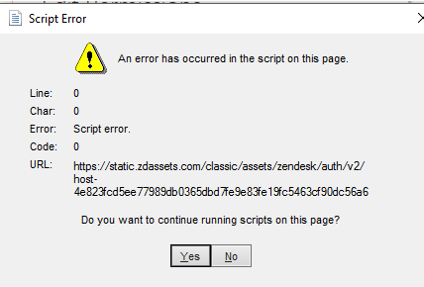
error.png

I get the following error.  Are there any suggestions to get this to work?

Anonymous
Not applicable

@mmace1,

You can connect to Zendesk.pbit in Power BI Desktop and combine other data sources in same PBIX file.


Reagrds,
Lydia

Thanks a lot! I was running in circles until now

Hi Scotton, could you please elaborate, how you got the connection Zendestk - Power BI working? I am currently facing the problem that using the free connector app in the power BI apps only allows me to draw limited data, so not all tickets. Are you able to show all ticket data in power BI?

Helpful resources

Announcements
Power BI DataViz World Championships

Power BI Dataviz World Championships

The Power BI Data Visualization World Championships is back! Get ahead of the game and start preparing now!

December 2025 Power BI Update Carousel

Power BI Monthly Update - December 2025

Check out the December 2025 Power BI Holiday Recap!

FabCon Atlanta 2026 carousel

FabCon Atlanta 2026

Join us at FabCon Atlanta, March 16-20, for the ultimate Fabric, Power BI, AI and SQL community-led event. Save $200 with code FABCOMM.

Top Solution Authors