Join us at FabCon Atlanta from March 16 - 20, 2026, for the ultimate Fabric, Power BI, AI and SQL community-led event. Save $200 with code FABCOMM.
Register now!Vote for your favorite vizzies from the Power BI Dataviz World Championship submissions. Vote now!
Hi,
In colum1 I want to delete rows with text 'Ending Balance for Period' and 'GL JE Name' how would I do this?
Many thanks
Solved! Go to Solution.
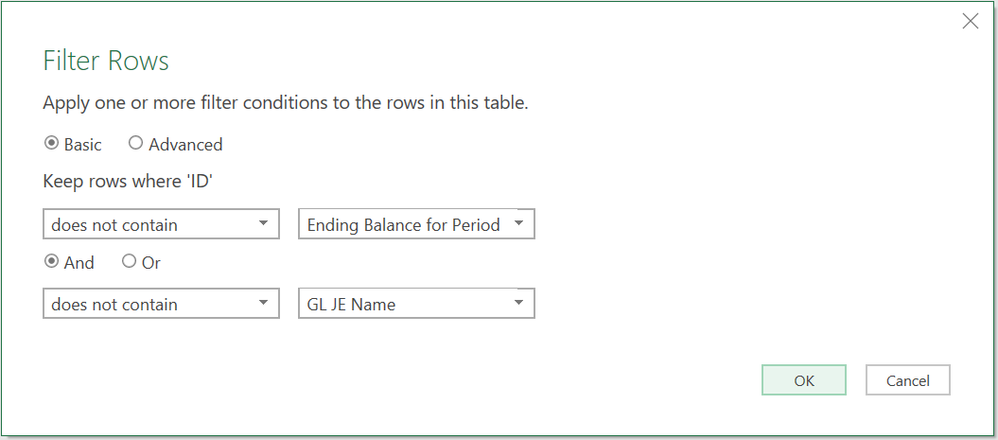
Just filter them out. The logic here is you won't technically be removing them, but you'll be selecting all rows that don't have that text.
It will generate code similar to this:
=Table.SelectRows(#"Changed Type", each not Text.Contains([ID], "Ending Balance for Period") and not Text.Contains([ID], "GL JE Name"))
DAX is for Analysis. Power Query is for Data Modeling
Proud to be a Super User!
MCSA: BI ReportingJust filter them out. The logic here is you won't technically be removing them, but you'll be selecting all rows that don't have that text.
It will generate code similar to this:
=Table.SelectRows(#"Changed Type", each not Text.Contains([ID], "Ending Balance for Period") and not Text.Contains([ID], "GL JE Name"))
DAX is for Analysis. Power Query is for Data Modeling
Proud to be a Super User!
MCSA: BI ReportingThank you again for the support
Vote for your favorite vizzies from the Power BI World Championship submissions!
If you love stickers, then you will definitely want to check out our Community Sticker Challenge!
Check out the January 2026 Power BI update to learn about new features.
| User | Count |
|---|---|
| 10 | |
| 6 | |
| 5 | |
| 4 | |
| 3 |
| User | Count |
|---|---|
| 14 | |
| 11 | |
| 8 | |
| 7 | |
| 6 |