cancel
Showing results for 
Search instead for 
Did you mean: 

We've captured the moments from FabCon & SQLCon that everyone is talking about, and we are bringing them to the community, live and on-demand. Starts on April 14th. Register now

Reply
craig811
Helper III
Helper III

How do i delete rows with text

Hi,


In colum1 I want to delete rows with text 'Ending Balance for Period' and 'GL JE Name'  how would I do this?


Many thanks 

1 ACCEPTED SOLUTION
edhans
Community Champion
Community Champion

Just filter them out. The logic here is you won't technically be removing them, but you'll be selecting all rows that don't have that text.


  1. On the column where this text appears, click the filter icon dropdown next to the column name and select Text Filters, then Does Not Contain
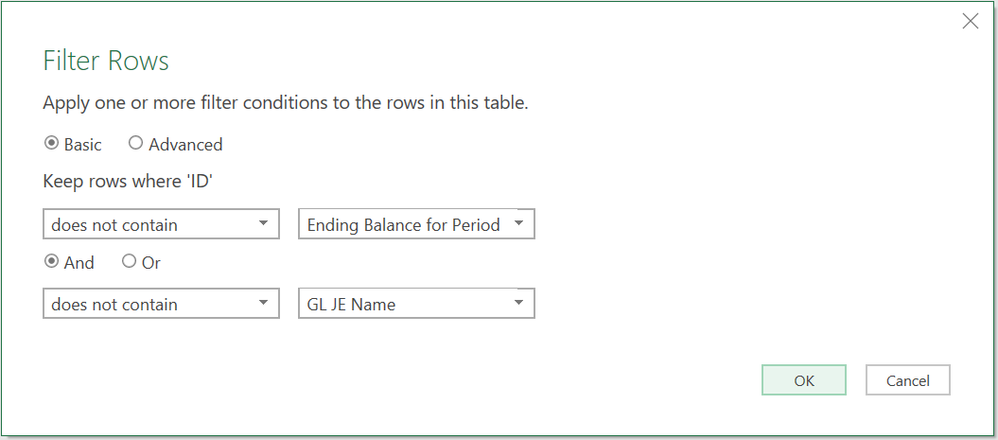
  2. Fill in the dialog box as shown below.

It will generate code similar to this:


=Table.SelectRows(#"Changed Type", each not Text.Contains([ID], "Ending Balance for Period") and not Text.Contains([ID], "GL JE Name"))


2020-02-13 08_04_50-.png


Did I answer your question? Mark my post as a solution!
Did my answers help arrive at a solution? Give it a kudos by clicking the Thumbs Up!

DAX is for Analysis. Power Query is for Data Modeling


Proud to be a Super User!

MCSA: BI Reporting

View solution in original post

3 REPLIES 3
Anonymous
Not applicable

Remove Rows Using Power Query
  1. This will open up the Power Query Editor.
  2. Go to Home > Reduce Rows > Remove Rows > Remove Top Rows.
  3. Go to Home > Reduce Rows > Remove Rows > Remove Bottom Rows.
  4. Go to Home > Reduce Rows > Remove Rows > Remove Alternate Rows.
edhans
Community Champion
Community Champion

Just filter them out. The logic here is you won't technically be removing them, but you'll be selecting all rows that don't have that text.


  1. On the column where this text appears, click the filter icon dropdown next to the column name and select Text Filters, then Does Not Contain
  2. Fill in the dialog box as shown below.

It will generate code similar to this:


=Table.SelectRows(#"Changed Type", each not Text.Contains([ID], "Ending Balance for Period") and not Text.Contains([ID], "GL JE Name"))


2020-02-13 08_04_50-.png


Did I answer your question? Mark my post as a solution!
Did my answers help arrive at a solution? Give it a kudos by clicking the Thumbs Up!

DAX is for Analysis. Power Query is for Data Modeling


Proud to be a Super User!

MCSA: BI Reporting

Thank you again for the support

Helpful resources

Announcements
New to Fabric survey Carousel

New to Fabric Survey

If you have recently started exploring Fabric, we'd love to hear how it's going. Your feedback can help with product improvements.

Power BI DataViz World Championships carousel

Power BI DataViz World Championships - June 2026

A new Power BI DataViz World Championship is coming this June! Don't miss out on submitting your entry.

Join our Fabric User Panel

Join our Fabric User Panel

Share feedback directly with Fabric product managers, participate in targeted research studies and influence the Fabric roadmap.