Join us at FabCon Atlanta from March 16 - 20, 2026, for the ultimate Fabric, Power BI, AI and SQL community-led event. Save $200 with code FABCOMM.
Register now!The Power BI Data Visualization World Championships is back! Get ahead of the game and start preparing now! Learn more
Dear All
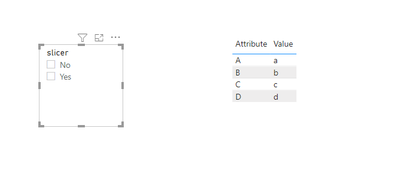
I have a slicer , that has value "Yes" and "No" as drop down , My dashboard also has a table with fOUR detail columns . my question is I want the table to change as per the slicer value selected . so for example if I select No in the slicer in the table i should see column A, column B , column C , and column D.
However if i select Yes in the slicer , I should see additioanl column E and F in the table along with A, B C and D columns. Having said this the default view of my table should include only four columnns, its only when i select yes , it should show additional columns in the table.
How can this be achieved?- thank you!
Solved! Go to Solution.
Hi @sks2701 ,
If you want to use slicer to achieve this, I think you need to transfrom your datasets using 'unpivot columns' in power query editors; then create a measure like this, put it in the table visual and set its value as 1 or 2:
Visual control =
IF (
SELECTEDVALUE ( 'Slicer table'[slicer] ) = "Yes",
1,
IF (
(
SELECTEDVALUE ( 'Slicer table'[slicer] ) = "No"
|| NOT ( ISFILTERED ( 'Slicer table'[slicer] ) )
)
&& (
SELECTEDVALUE ( 'Table'[Attribute] ) = "A"
|| SELECTEDVALUE ( 'Table'[Attribute] ) = "B"
|| SELECTEDVALUE ( 'Table'[Attribute] ) = "C"
|| SELECTEDVALUE ( 'Table'[Attribute] ) = "D"
),
2
)
)
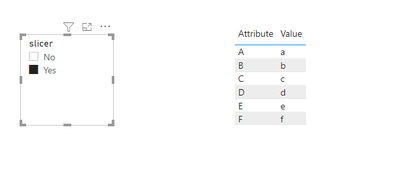
Attached a sample file in the below, hopes to help you.
If not want to transform data, bookmarks like @ StefanoGrimaldi mentioned is another good way to achieve this.
Best Regards,
Community Support Team _ Yingjie Li
If this post helps, then please consider Accept it as the solution to help the other members find it more quickly.
Hi @sks2701 ,
If you want to use slicer to achieve this, I think you need to transfrom your datasets using 'unpivot columns' in power query editors; then create a measure like this, put it in the table visual and set its value as 1 or 2:
Visual control =
IF (
SELECTEDVALUE ( 'Slicer table'[slicer] ) = "Yes",
1,
IF (
(
SELECTEDVALUE ( 'Slicer table'[slicer] ) = "No"
|| NOT ( ISFILTERED ( 'Slicer table'[slicer] ) )
)
&& (
SELECTEDVALUE ( 'Table'[Attribute] ) = "A"
|| SELECTEDVALUE ( 'Table'[Attribute] ) = "B"
|| SELECTEDVALUE ( 'Table'[Attribute] ) = "C"
|| SELECTEDVALUE ( 'Table'[Attribute] ) = "D"
),
2
)
)
Attached a sample file in the below, hopes to help you.
If not want to transform data, bookmarks like @ StefanoGrimaldi mentioned is another good way to achieve this.
Best Regards,
Community Support Team _ Yingjie Li
If this post helps, then please consider Accept it as the solution to help the other members find it more quickly.
hey for this ou wont do with a slicer you will neeed selection pane and bookmakrs read this for more detail about it:
https://docs.microsoft.com/en-us/power-bi/create-reports/desktop-bookmarks
https://www.youtube.com/watch?v=_Afcj8mT5_Q specially here you have a full build example.
if this solve your question please give some kudos and mark as solution for others to find.
Proud to be a Super User!
The Power BI Data Visualization World Championships is back! Get ahead of the game and start preparing now!
| User | Count |
|---|---|
| 17 | |
| 9 | |
| 9 | |
| 7 | |
| 7 |