Learn from the best! Meet the four finalists headed to the FINALS of the Power BI Dataviz World Championships! Register now
Dear All
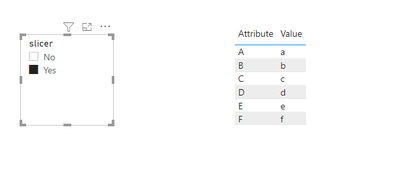
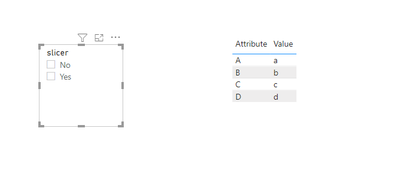
I have a slicer , that has value "Yes" and "No" as drop down , My dashboard also has a table with fOUR detail columns . my question is I want the table to change as per the slicer value selected . so for example if I select No in the slicer in the table i should see column A, column B , column C , and column D.
However if i select Yes in the slicer , I should see additioanl column E and F in the table along with A, B C and D columns. Having said this the default view of my table should include only four columnns, its only when i select yes , it should show additional columns in the table.
How can this be achieved?- thank you!
Solved! Go to Solution.
Hi @sks2701 ,
If you want to use slicer to achieve this, I think you need to transfrom your datasets using 'unpivot columns' in power query editors; then create a measure like this, put it in the table visual and set its value as 1 or 2:
Visual control =
IF (
SELECTEDVALUE ( 'Slicer table'[slicer] ) = "Yes",
1,
IF (
(
SELECTEDVALUE ( 'Slicer table'[slicer] ) = "No"
|| NOT ( ISFILTERED ( 'Slicer table'[slicer] ) )
)
&& (
SELECTEDVALUE ( 'Table'[Attribute] ) = "A"
|| SELECTEDVALUE ( 'Table'[Attribute] ) = "B"
|| SELECTEDVALUE ( 'Table'[Attribute] ) = "C"
|| SELECTEDVALUE ( 'Table'[Attribute] ) = "D"
),
2
)
)
Attached a sample file in the below, hopes to help you.
If not want to transform data, bookmarks like @ StefanoGrimaldi mentioned is another good way to achieve this.
Best Regards,
Community Support Team _ Yingjie Li
If this post helps, then please consider Accept it as the solution to help the other members find it more quickly.
Hi @sks2701 ,
If you want to use slicer to achieve this, I think you need to transfrom your datasets using 'unpivot columns' in power query editors; then create a measure like this, put it in the table visual and set its value as 1 or 2:
Visual control =
IF (
SELECTEDVALUE ( 'Slicer table'[slicer] ) = "Yes",
1,
IF (
(
SELECTEDVALUE ( 'Slicer table'[slicer] ) = "No"
|| NOT ( ISFILTERED ( 'Slicer table'[slicer] ) )
)
&& (
SELECTEDVALUE ( 'Table'[Attribute] ) = "A"
|| SELECTEDVALUE ( 'Table'[Attribute] ) = "B"
|| SELECTEDVALUE ( 'Table'[Attribute] ) = "C"
|| SELECTEDVALUE ( 'Table'[Attribute] ) = "D"
),
2
)
)
Attached a sample file in the below, hopes to help you.
If not want to transform data, bookmarks like @ StefanoGrimaldi mentioned is another good way to achieve this.
Best Regards,
Community Support Team _ Yingjie Li
If this post helps, then please consider Accept it as the solution to help the other members find it more quickly.
hey for this ou wont do with a slicer you will neeed selection pane and bookmakrs read this for more detail about it:
https://docs.microsoft.com/en-us/power-bi/create-reports/desktop-bookmarks
https://www.youtube.com/watch?v=_Afcj8mT5_Q specially here you have a full build example.
if this solve your question please give some kudos and mark as solution for others to find.
Proud to be a Super User!
A new Power BI DataViz World Championship is coming this June! Don't miss out on submitting your entry.
Share feedback directly with Fabric product managers, participate in targeted research studies and influence the Fabric roadmap.
| User | Count |
|---|---|
| 5 | |
| 4 | |
| 4 | |
| 3 | |
| 2 |
| User | Count |
|---|---|
| 11 | |
| 10 | |
| 8 | |
| 7 | |
| 6 |