cancel
Showing results for 
Search instead for 
Did you mean: 

Try your skills in the Power BI Dataviz World Championship! Round one ends June 26. Join now

Reply
Hannisky
Frequent Visitor

Help with creating function

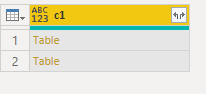
I'm trying to create a function that makes changes to tables before expanding. The starting point is as below a column of tables. 

Hannisky_0-1646225236527.png

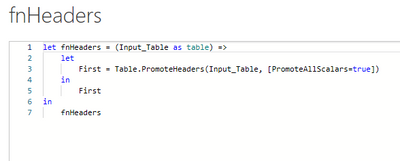
My function at present takes a table and promotes headers. 


Hannisky_1-1646225399659.png


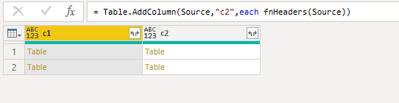
It kind of works as intended but not getting the correct result 


Hannisky_2-1646225543016.png

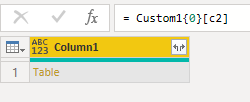
Each table in column c2 has another table and the table contained does not have promoted headers. Not sure where my syntax is incorrect. 

Hannisky_3-1646225576093.png


Any help would be appreciated.


1 ACCEPTED SOLUTION
BA_Pete
Super User
Super User

Hi @Hannisky ,


It looks like you should be invoking your function in a TransformColumns function, something like this:


Table.TransformColumns(Source, {"c1", each fnHeaders(_)})


Pete


Now accepting Kudos! If my post helped you, why not give it a thumbs-up?

Proud to be a Datanaut!


View solution in original post

2 REPLIES 2
BA_Pete
Super User
Super User

Hi @Hannisky ,


It looks like you should be invoking your function in a TransformColumns function, something like this:


Table.TransformColumns(Source, {"c1", each fnHeaders(_)})


Pete


Now accepting Kudos! If my post helped you, why not give it a thumbs-up?

Proud to be a Datanaut!


Perfect. Thank you

Helpful resources

Announcements
Fabric Data Days is here Carousel

Fabric Data Days 2026

Don't miss out on Data Days, June 15 through August 7. Learn Fabric, Power BI, SQL, AI and more.

Power BI DataViz World Championships carousel

Power BI DataViz World Championships - June 2026

A new Power BI DataViz World Championship is coming this June! Don't miss out on submitting your entry.