cancel
Showing results for 
Search instead for 
Did you mean: 

Try your skills in the Power BI Dataviz World Championship! Round one ends June 26. Join now

Reply
zbaker83
Frequent Visitor

Help with conversion matrix in Power Query

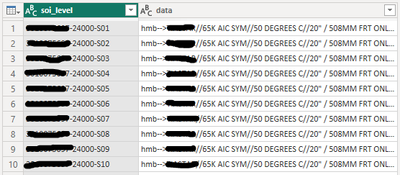
I have a list of Values coming from a source SQL. This list of values is related to a Sales Order and is not in the a "clean" format for configuration buidling. My idea is to have a table as follows:

zbaker83_1-1701214869171.png

Where the data represents a single designed configuration of values based on the Sales Order. Example in row 1,

for "-S01" the values are "65K AIC SYM", "50 DEGREES C", etc.


I then want to convert this using values that are "clean" in my opinion. For this, I have a value to value conversion table. For example, the value "65K AIC SYM" converts to "65K".


My final table I would like to look like this:

Col 1 Row 1 = hmb-->65K AIC SYM//50 DEGREES C//...

Col 2 Row 1 = hmb-->65K//50C//...


This will allow Col 1 to relate to my customer sales orders and Col 2 to relate to my configuration. Any help would be greatly appreciated as I have been stuck on this for some time.


1 REPLY 1
AlienSx
Super User
Super User

hello, @zbaker83 first you need to wrap your replacements into a record with "old" values as record fields and "new" values as field values like [65K AIC SYM = 65K, 50 DEGREES C = 50C, ...]. You can create this manually but better to create this table in Excel. This should be table with 2 columns: Name and Value. Then load it to PQ and apply Record.FromTable function to this table.

rec = Record.FromTable(rec_tbl)

this gives you your record. Then use it in Record.FieldOrDefault function like this:

    new_col = Table.AddColumn(
        data_table, "my_configuration",
        (x) =>
            [lst = Splitter.SplitTextByAnyDelimiter({"//", "/"})(x[data]),
            tx = List.Transform(lst, (w) => Record.FieldOrDefault(rec, w, w)),
            txt = Text.Combine(tx, "//")][txt]
    )


Helpful resources

Announcements
Fabric Data Days is here Carousel

Data Days 2026

Don't miss out on Data Days, June 15 through August 7. Learn Fabric, Power BI, SQL, AI and more.

May Power BI Update Carousel

Power BI Monthly Update - May 2026

Check out the May 2026 Power BI update to learn about new features.

Power BI DataViz World Championships carousel

Power BI DataViz World Championships - June 2026

A new Power BI DataViz World Championship is coming this June! Don't miss out on submitting your entry.