cancel
Showing results for 
Search instead for 
Did you mean: 

View all the Fabric Data Days sessions on demand. View schedule

Reply
dmarics28
Frequent Visitor

Help! with a time column

Hi Guys,

Help needed.

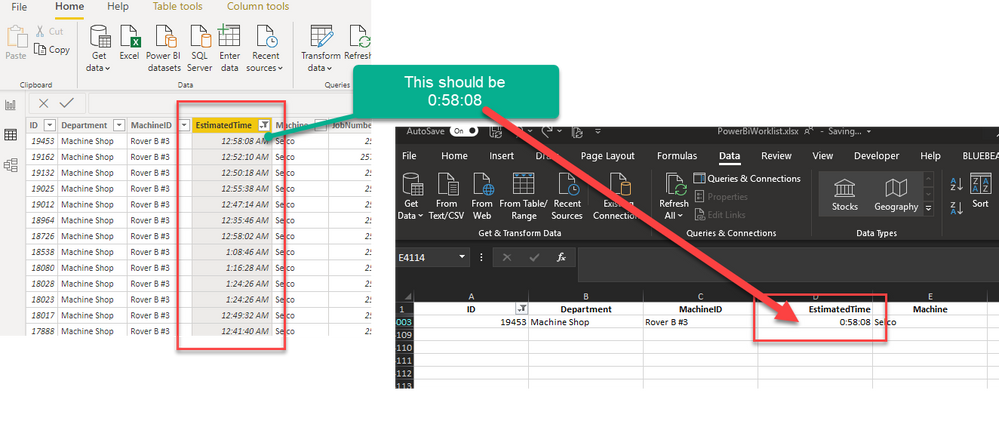
I have a column from an excel data source. it is in this format   0:30:00  (0 hours, 30 mins, 0 secs)


When it loads up in the power query, the format is automatically changed to 12:30:00 AM - Its auto converting to an actual time.

How do i change or get my actual excel data in, rather than this auto correction?

2020-07-16_10-53-18.png

1 ACCEPTED SOLUTION

Oh Thanks so much. That did it.

It was auto changing when Promoting headers (Use First Row as Headers) for some reason. Thanks!

View solution in original post

2 REPLIES 2
lbendlin
Super User
Super User

in Power Query remove the "Changed Type" step and specify the column types manually (for example "duration").  In the new July version of Power BI desktop you can now finally switch off that auto format silliness globally.

Oh Thanks so much. That did it.

It was auto changing when Promoting headers (Use First Row as Headers) for some reason. Thanks!

Helpful resources

Announcements
November Power BI Update Carousel

Power BI Monthly Update - November 2025

Check out the November 2025 Power BI update to learn about new features.

Fabric Data Days Carousel

Fabric Data Days

Advance your Data & AI career with 50 days of live learning, contests, hands-on challenges, study groups & certifications and more!

FabCon Atlanta 2026 carousel

FabCon Atlanta 2026

Join us at FabCon Atlanta, March 16-20, for the ultimate Fabric, Power BI, AI and SQL community-led event. Save $200 with code FABCOMM.