This time we’re going bigger than ever. Fabric, Power BI, SQL, AI and more. We're covering it all. You won't want to miss it.
Learn moreDid you hear? There's a new SQL AI Developer certification (DP-800). Start preparing now and be one of the first to get certified. Register now
Hi Guys,
Help needed.
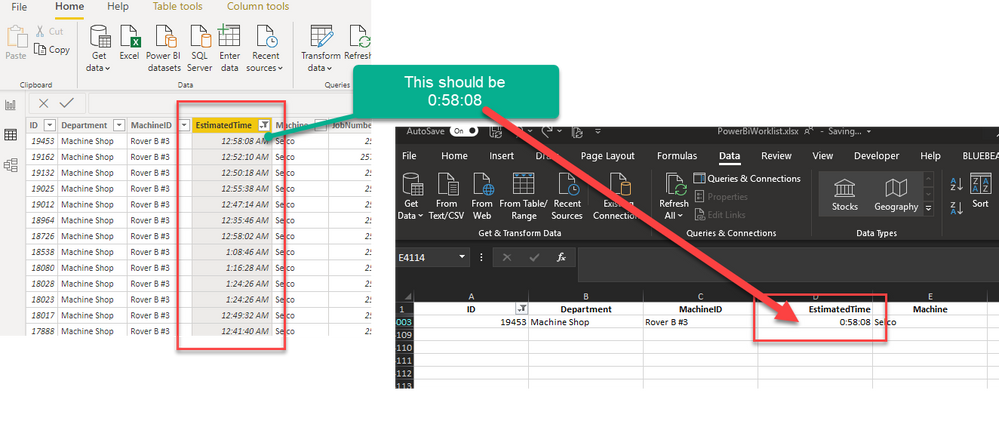
I have a column from an excel data source. it is in this format 0:30:00 (0 hours, 30 mins, 0 secs)
When it loads up in the power query, the format is automatically changed to 12:30:00 AM - Its auto converting to an actual time.
How do i change or get my actual excel data in, rather than this auto correction?
Solved! Go to Solution.
Oh Thanks so much. That did it.
It was auto changing when Promoting headers (Use First Row as Headers) for some reason. Thanks!
in Power Query remove the "Changed Type" step and specify the column types manually (for example "duration"). In the new July version of Power BI desktop you can now finally switch off that auto format silliness globally.
Oh Thanks so much. That did it.
It was auto changing when Promoting headers (Use First Row as Headers) for some reason. Thanks!
Check out the April 2026 Power BI update to learn about new features.
Sign up to receive a private message when registration opens and key events begin.
If you have recently started exploring Fabric, we'd love to hear how it's going. Your feedback can help with product improvements.