cancel
Showing results for 
Search instead for 
Did you mean: 

July 7 - July 17 | Round 2 of the Power BI Dataviz World Championships. Don't miss your chance! Learn more

Reply
dmarics28
Frequent Visitor

Help! with a time column

Hi Guys,

Help needed.

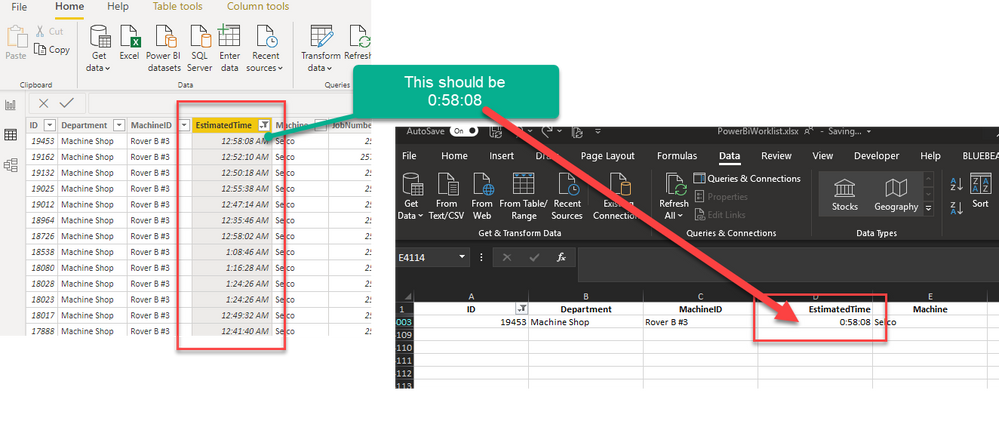
I have a column from an excel data source. it is in this format   0:30:00  (0 hours, 30 mins, 0 secs)


When it loads up in the power query, the format is automatically changed to 12:30:00 AM - Its auto converting to an actual time.

How do i change or get my actual excel data in, rather than this auto correction?

2020-07-16_10-53-18.png

1 ACCEPTED SOLUTION

Oh Thanks so much. That did it.

It was auto changing when Promoting headers (Use First Row as Headers) for some reason. Thanks!

View solution in original post

2 REPLIES 2
lbendlin
Super User
Super User

in Power Query remove the "Changed Type" step and specify the column types manually (for example "duration").  In the new July version of Power BI desktop you can now finally switch off that auto format silliness globally.

Oh Thanks so much. That did it.

It was auto changing when Promoting headers (Use First Row as Headers) for some reason. Thanks!

Helpful resources

Announcements
FabCon and SQLCon Barcelona 2026

FabCon & SQLCon – Barcelona 2026

Join us in Barcelona for FabCon and SQLCon, the Fabric, Power BI, SQL, and AI community event. Save €200 with code FABCMTY200.

Fabric Community Sticker Design Challenge Barcelona Carousel

Fabric Community Sticker Challenge - Barcelona 2026

If you love stickers, then you will definitely want to check out our community sticker challenge, Barcelona edition!

July Power BI Update Carousel

Power BI Monthly Update - July 2026

Check out the July 2026 Power BI update to learn about new features.

Power BI DataViz World Championships carousel

Power BI DataViz World Championships - June 2026

A new Power BI DataViz World Championship is coming this June! Don't miss out on submitting your entry.