Join us at FabCon Atlanta from March 16 - 20, 2026, for the ultimate Fabric, Power BI, AI and SQL community-led event. Save $200 with code FABCOMM.
Register now!Learn from the best! Meet the four finalists headed to the FINALS of the Power BI Dataviz World Championships! Register now
Hi,
I have a connection to our datalake via ODBC (hortonworks). This works great, I can see all the tables/schemes that I have been given access to etc.
I had some changes to come of the tables and our IT dept. wrote a query to me (believe its SQL), I can execute this query with no problem if I access the server through the HUE interface. BUt I'm not sure how I connect/execute this query in powerBI?
I want to be able to use this along with the other tables/schemes i pull from the datalake
Thanks!
Kristoffer
Solved! Go to Solution.
@Kristofferaabo,
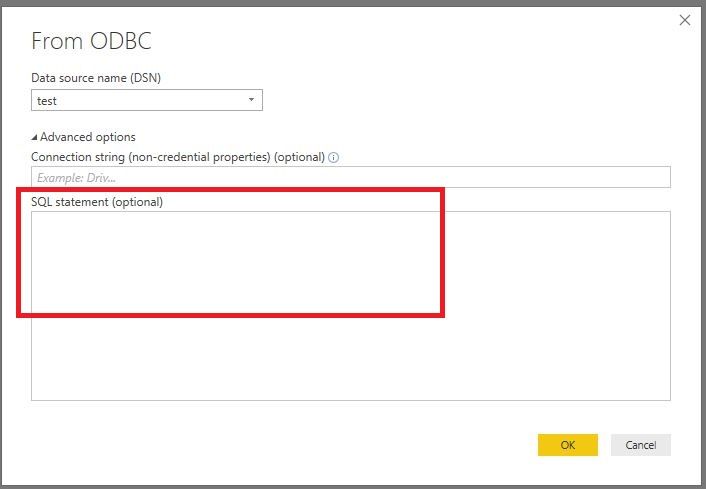
Uisng the ODBC connector in Power BI Desktop, you can input the query into SQL Statement textbox.
Regards,
Lydia
@Kristofferaabo,
Uisng the ODBC connector in Power BI Desktop, you can input the query into SQL Statement textbox.
Regards,
Lydia
Exactly! - Wasn't aware it was so simple.. 🙂
THANKS
Share feedback directly with Fabric product managers, participate in targeted research studies and influence the Fabric roadmap.
Check out the February 2026 Power BI update to learn about new features.
| User | Count |
|---|---|
| 16 | |
| 12 | |
| 9 | |
| 7 | |
| 6 |