Join us in Barcelona for FabCon and SQLCon, September 28 - October 1, 2026.
This is best Fabric, Power BI, SQL and AI community event. How do we know? The last event sold out! Save €200 with code FABCMTY200.
Register now- Power BI forums
- Get Help with Power BI
- Desktop
- Service
- Report Server
- Power Query
- Mobile Apps
- Developer
- DAX Commands and Tips
- Custom Visuals Development Discussion
- Health and Life Sciences
- Power BI Spanish forums
- Translated Spanish Desktop
- Training and Consulting
- Instructor Led Training
- Dashboard in a Day for Women, by Women
- Galleries
- Data Stories Gallery
- Themes Gallery
- Contests Gallery
- QuickViz Gallery
- Quick Measures Gallery
- Visual Calculations Gallery
- Fabric Apps Gallery
- Notebook Gallery
- Translytical Task Flow Gallery
- TMDL Gallery
- R Script Showcase
- Webinars and Video Gallery
- Ideas
- Custom Visuals Ideas (read-only)
- Issues
- Issues
- Events
- Upcoming Events
The Fabric community is now in read-only for platform upgrade. Learn more
- Power BI forums
- Forums
- Get Help with Power BI
- Power Query
- Re: Help with M code
- Subscribe to RSS Feed
- Mark Topic as New
- Mark Topic as Read
- Float this Topic for Current User
- Bookmark
- Subscribe
- Printer Friendly Page

- Mark as New
- Bookmark
- Subscribe
- Mute
- Subscribe to RSS Feed
- Permalink
Help with M code
Hi all,
I have a column named "version_orig" that I would like a conditional column named "version" to refer to when populating values in it.
Here's the logic: If the value in a row within the version_orig column is null, then determine the maximum value in the version_orig column, add 1, then populate that value in the version column, else retrieve the value in the version_orig column and populate that in the version column.
Here's how it should look:
| version_orig | version |
| null | 37 |
| null | 37 |
| null | 37 |
| 36 | 36 |
| 35 | 35 |
| 34 | 34 |
The below expression is not working. The error message is "[Expression.Error] We cannot apply field access to the type Function."
if [version_orig] = null then List.MaxN[version_orig] + 1 else [version_orig]
Any help here will be appreciated!
Solved! Go to Solution.


- Mark as New
- Bookmark
- Subscribe
- Mute
- Subscribe to RSS Feed
- Permalink
The formula you need is this:
if [version_orig] = null then List.Max(#"Changed Type"[version_orig]) + 1 else [version_orig]
Full code:
let
    Source = Table.FromRows(Json.Document(Binary.Decompress(Binary.FromText("i45WUtJRMjZXitXBzjI2A7HNIGxTENsUwjYBsU2UYmMB", BinaryEncoding.Base64), Compression.Deflate)), let _t = ((type nullable text) meta [Serialized.Text = true]) in type table [version_orig = _t, version = _t]),
    #"Replaced Value" = Table.ReplaceValue(Source,"",null,Replacer.ReplaceValue,{"version_orig"}),
    #"Changed Type" = Table.TransformColumnTypes(#"Replaced Value",{{"version_orig", Int64.Type}, {"version", Int64.Type}}),
    #"Added Custom" = Table.AddColumn(#"Changed Type", "Custom", each if [version_orig] = null then List.Max(#"Changed Type"[version_orig]) + 1 else [version_orig])
in
    #"Added Custom"
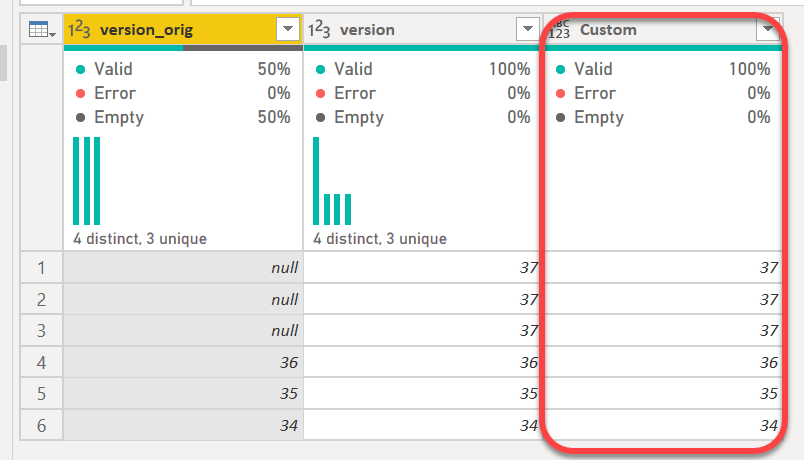
List.Max is a function and requires parens, and you want to use the list from the table, which is the previous step - thus #"Changed Type" in my case. You cannot use List.Max with a field like you did.
How to use M code provided in a blank query:
1) In Power Query, select New Source, then Blank Query
2) On the Home ribbon, select "Advanced Editor" button
3) Remove everything you see, then paste the M code I've given you in that box.
4) Press Done
5) See this article if you need help using this M code in your model.
Did I answer your question? Mark my post as a solution!
Did my answers help arrive at a solution? Give it a kudos by clicking the Thumbs Up!
DAX is for Analysis. Power Query is for Data Modeling
Proud to be a Super User!
MCSA: BI Reporting
- Mark as New
- Bookmark
- Subscribe
- Mute
- Subscribe to RSS Feed
- Permalink
let
    Origine = Table.FromRows(Json.Document(Binary.Decompress(Binary.FromText("i45WUtJRMjZXitXBzjI2A7HNIGxTENsUwjYBsU2UYmMB", BinaryEncoding.Base64), Compression.Deflate)), let _t = ((type nullable text) meta [Serialized.Text = true]) in type table [version_orig = _t, version = _t]),
    #"Rimosse colonne" = Table.RemoveColumns(Origine,{"version"}),
    #"Modificato tipo" = Table.TransformColumnTypes(#"Rimosse colonne",{{"version_orig", Int64.Type}}),
    #"Sostituito valore" = Table.ReplaceValue(#"Modificato tipo",null,List.Max(#"Modificato tipo"[version_orig])+1,Replacer.ReplaceValue,{"version_orig"})
in
#"Sostituito valore"- Mark as New
- Bookmark
- Subscribe
- Mute
- Subscribe to RSS Feed
- Permalink
The formula you need is this:
if [version_orig] = null then List.Max(#"Changed Type"[version_orig]) + 1 else [version_orig]
Full code:
let
    Source = Table.FromRows(Json.Document(Binary.Decompress(Binary.FromText("i45WUtJRMjZXitXBzjI2A7HNIGxTENsUwjYBsU2UYmMB", BinaryEncoding.Base64), Compression.Deflate)), let _t = ((type nullable text) meta [Serialized.Text = true]) in type table [version_orig = _t, version = _t]),
    #"Replaced Value" = Table.ReplaceValue(Source,"",null,Replacer.ReplaceValue,{"version_orig"}),
    #"Changed Type" = Table.TransformColumnTypes(#"Replaced Value",{{"version_orig", Int64.Type}, {"version", Int64.Type}}),
    #"Added Custom" = Table.AddColumn(#"Changed Type", "Custom", each if [version_orig] = null then List.Max(#"Changed Type"[version_orig]) + 1 else [version_orig])
in
    #"Added Custom"
List.Max is a function and requires parens, and you want to use the list from the table, which is the previous step - thus #"Changed Type" in my case. You cannot use List.Max with a field like you did.
How to use M code provided in a blank query:
1) In Power Query, select New Source, then Blank Query
2) On the Home ribbon, select "Advanced Editor" button
3) Remove everything you see, then paste the M code I've given you in that box.
4) Press Done
5) See this article if you need help using this M code in your model.
Did I answer your question? Mark my post as a solution!
Did my answers help arrive at a solution? Give it a kudos by clicking the Thumbs Up!
DAX is for Analysis. Power Query is for Data Modeling
Proud to be a Super User!
MCSA: BI Reporting- Mark as New
- Bookmark
- Subscribe
- Mute
- Subscribe to RSS Feed
- Permalink
First; thank you. This looks to be the solution after I work through an error I'm receiving.
I copied rows 13-17 that were produced from Query1, after my "Renamed Columns" step, in to the advanced editor for my query:

But it's producing an error; "Expression.Error: The field 'version_orig' of the record wasn't found."
I noticed that when I click on the last applied step in my query, the version column, which I renamed version_orig, had its name reverted back to version.
Any thoughts there?
- Mark as New
- Bookmark
- Subscribe
- Mute
- Subscribe to RSS Feed
- Permalink
I think this is your error:

In your #"Changed Type" step (not shown, so on rows 2-11 somewhere, there is no version_orig column and even if there was, your row 15 would be ignoring all of the code between that and this.
Change it to refer to my #"Changed Type1" step on row 14 and it should work. Same in List.Max - the table it starts with should be #"Changed Type1"
Did I answer your question? Mark my post as a solution!
Did my answers help arrive at a solution? Give it a kudos by clicking the Thumbs Up!
DAX is for Analysis. Power Query is for Data Modeling
Proud to be a Super User!
MCSA: BI Reporting- Mark as New
- Bookmark
- Subscribe
- Mute
- Subscribe to RSS Feed
- Permalink
Awesome. Thanks a million! This has been a big help.
- Mark as New
- Bookmark
- Subscribe
- Mute
- Subscribe to RSS Feed
- Permalink
Great @Anonymous - glad I was able to assist!
Did I answer your question? Mark my post as a solution!
Did my answers help arrive at a solution? Give it a kudos by clicking the Thumbs Up!
DAX is for Analysis. Power Query is for Data Modeling
Proud to be a Super User!
MCSA: BI Reporting- Mark as New
- Bookmark
- Subscribe
- Mute
- Subscribe to RSS Feed
- Permalink
@Anonymous - did my solution workf or you? If so, can you mark it as the solution to show this was solved? If not, post back with questions/issues.
Thanks!
Did I answer your question? Mark my post as a solution!
Did my answers help arrive at a solution? Give it a kudos by clicking the Thumbs Up!
DAX is for Analysis. Power Query is for Data Modeling
Proud to be a Super User!
MCSA: BI Reporting

- Mark as New
- Bookmark
- Subscribe
- Mute
- Subscribe to RSS Feed
- Permalink
The problem is that [version_org] is not a list that you can take a max of. Also, List.MaxN is a function, not a table or record with a field called [version_org].
I think you want your step to look like this:
= Table.AddColumn(
    #"Changed Type", "version", each
    if [version_orig] = null
    then List.Max(#"Changed Type"[version_orig]) + 1
    else [version_orig]
)
Change #"Changed Type" to whatever the name of your previous step is.
Helpful resources

FabCon & SQLCon – Barcelona 2026
Join us in Barcelona for FabCon and SQLCon, the Fabric, Power BI, SQL, and AI community event. Save €200 with code FABCMTY200.

Power BI DataViz World Championships - June 2026
A new Power BI DataViz World Championship is coming this June! Don't miss out on submitting your entry.


