cancel
Showing results for 
Search instead for 
Did you mean: 

The Power BI Data Visualization World Championships is back! Get ahead of the game and start preparing now! Learn more

Reply
ScotchCat
Regular Visitor

Help! Top 5 and Others

Help! I will need to create a pie chart that shows the top 5 by Rank (1-5) and group all the rest (Rank 6-9) into an 'Other' category.  I'm pretty new at this - be gentle!  Thanks in advance! 


My table is called CoolSports 

Here's the data in my table: 


CATEGORYROW_COUNTRANK
WaterSki8121
SnowSki7272
Biking6993
Mountain_Bike5474
Swim3585
Hiking2106
Telemark1757
Walk508
Jog239
1 ACCEPTED SOLUTION
mahoneypat
Microsoft Employee
Microsoft Employee

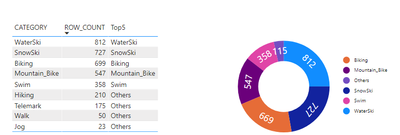
You can do this with the Charticulator visual.  See example below.  The key is to make a measure like the one below along with the Category and Row Count columns in your visual, and then Group By the new measure and make it a radial scaffold.

(3) Charticulator: Now a Power BI Custom Visual! (with Daniel Marsh-Patrick) - YouTube


mahoneypat_0-1625871447014.png


Top5 =
VAR top5 =
    TOPN (
        5,
        ALLSELECTED ( CategoryRank[CATEGORY] ),
        CALCULATE ( SUM ( CategoryRank[ROW_COUNT] ) )DESC
    )
VAR thiscategory =
    SELECTEDVALUE ( CategoryRank[CATEGORY] )
VAR result =
    IF ( thiscategory IN top5thiscategory"Others" )
RETURN
    result


Pat


Did I answer your question? Mark my post as a solution! Kudos are also appreciated!

To learn more about Power BI, follow me on Twitter or subscribe on YouTube.


@mahoneypa HoosierBI on YouTube


View solution in original post

2 REPLIES 2
ScotchCat
Regular Visitor

I tried the suggested solution, it didn't work - back to square one. 

mahoneypat
Microsoft Employee
Microsoft Employee

You can do this with the Charticulator visual.  See example below.  The key is to make a measure like the one below along with the Category and Row Count columns in your visual, and then Group By the new measure and make it a radial scaffold.

(3) Charticulator: Now a Power BI Custom Visual! (with Daniel Marsh-Patrick) - YouTube


mahoneypat_0-1625871447014.png


Top5 =
VAR top5 =
    TOPN (
        5,
        ALLSELECTED ( CategoryRank[CATEGORY] ),
        CALCULATE ( SUM ( CategoryRank[ROW_COUNT] ) )DESC
    )
VAR thiscategory =
    SELECTEDVALUE ( CategoryRank[CATEGORY] )
VAR result =
    IF ( thiscategory IN top5thiscategory"Others" )
RETURN
    result


Pat


Did I answer your question? Mark my post as a solution! Kudos are also appreciated!

To learn more about Power BI, follow me on Twitter or subscribe on YouTube.


@mahoneypa HoosierBI on YouTube


Helpful resources

Announcements
Power BI DataViz World Championships

Power BI Dataviz World Championships

The Power BI Data Visualization World Championships is back! Get ahead of the game and start preparing now!

November Power BI Update Carousel

Power BI Monthly Update - November 2025

Check out the November 2025 Power BI update to learn about new features.

FabCon Atlanta 2026 carousel

FabCon Atlanta 2026

Join us at FabCon Atlanta, March 16-20, for the ultimate Fabric, Power BI, AI and SQL community-led event. Save $200 with code FABCOMM.