cancel
Showing results for 
Search instead for 
Did you mean: 

July 7 - July 17 | Round 2 of the Power BI Dataviz World Championships. Don't miss your chance! Learn more

Reply
ben-t
Frequent Visitor

Help - List.Generate dates with variable frequency in months

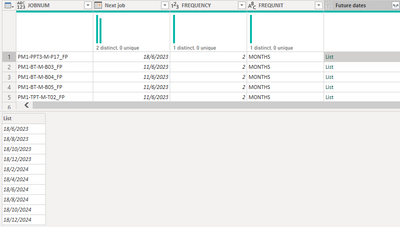
Hi, I'm trying to generate a list of jobs to do in the next 2 years
I have a working custom column that provides me the list of dates. 
But my jobs have varying frequencies of 2-12 months intervals. 


List.Generate(() => [Next job],
each Date.From(_) <= Date.From(Date.AddYears(Date.EndOfYear(DateTime.LocalNow()), 1)),
each Date.AddMonths(_, 2))

bent_2-1682408783789.png


Once I change my code to :

List.Generate(() => [Next job],
each Date.From(_) <= Date.From(Date.AddYears(Date.EndOfYear(DateTime.LocalNow()), 1)),
each Date.AddMonths( _ , [FREQUENCY]))


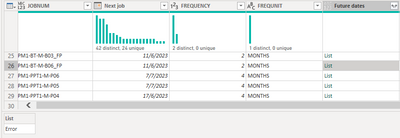
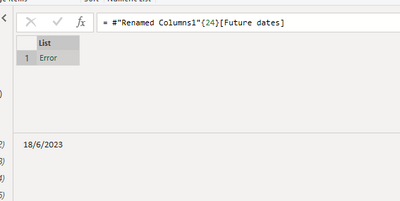
I get an error and when expanding further, it just shows me a date without any error message. 

bent_3-1682408917618.png

bent_4-1682408941105.png

Anyone knows what is causing this issue, and how I can work around it ?

Thanks

1 ACCEPTED SOLUTION
HotChilli
Community Champion
Community Champion

It might be a field access error.

Try

let freq = [FREQUENCY] in each Date.AddMonths( _ , freq))


View solution in original post

6 REPLIES 6
HotChilli
Community Champion
Community Champion

It might be a field access error.

Try

let freq = [FREQUENCY] in each Date.AddMonths( _ , freq))


It generates without issue once i added in this line
Thanks! 

Hi ben-t,


Could you share the full code that worked for you?

I think I've tried every possible code with the above solution, but I still get an error.


Thanks!

Hi @GekkeHellie

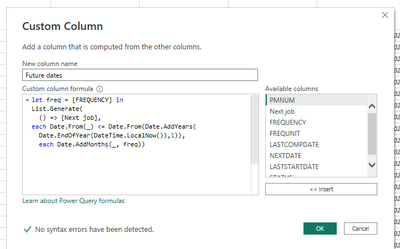
this is the code i used

let freq = [FREQUENCY] in
List.Generate(
() => [Next job],
each Date.From(_) <= Date.From(Date.AddYears(Date.EndOfYear(DateTime.LocalNow()),1)),
each Date.AddMonths(_, freq))

bent_2-1689043260344.png


Hi @ben-t ,


Your answer definitely helped me into the right direction.

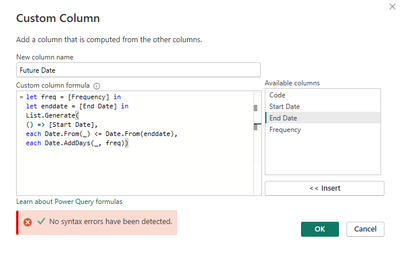
In the table there is a start date, end date and frequency and I also wanted to create a new row between the two dates based on de frequency.


My table looks like this:

GekkeHellie_0-1689064607678.png


But since I have a end date in a column, instead of a formula like yours, I still got a error.

So I also added the below line to the code:

let enddate = [End Date]

GekkeHellie_1-1689064855680.png

let freq = [Frequency] in
let enddate = [End Date] in
List.Generate(
() => [Start Date],
each Date.From(_) <= Date.From(enddate),
each Date.AddDays(_, freq))


Thanks for helping me out!


m_dekorte
Resident Rockstar
Resident Rockstar

Hi @ben-t 

Its an invironment/ item access issue, here's a work around. Just assign the field value to a variable and bring that into your calculation.


let n = [FREQUENCY] in List.Generate(() => [Next job],
each Date.From(_) <= Date.From(Date.AddYears(Date.EndOfYear(DateTime.LocalNow()), 1)),
each Date.AddMonths(_, n ))


Ps. If this helps solve your query please mark this post as Solution, thanks!

Helpful resources

Announcements
FabCon and SQLCon Barcelona 2026

FabCon & SQLCon – Barcelona 2026

Join us in Barcelona for FabCon and SQLCon, the Fabric, Power BI, SQL, and AI community event. Save €200 with code FABCMTY200.

60 days of Data Days Carousel

Data Days 2026

Join Data Days 2026: 60 days of free live/on-demand sessions, challenges, study groups, and certification opportunities.

Power BI DataViz World Championships carousel

Power BI DataViz World Championships - June 2026

A new Power BI DataViz World Championship is coming this June! Don't miss out on submitting your entry.

Top Solution Authors