cancel
Showing results for 
Search instead for 
Did you mean: 

The Power BI Data Visualization World Championships is back! Get ahead of the game and start preparing now! Learn more

Reply
ben-t
Frequent Visitor

Help - List.Generate dates with variable frequency in months

Hi, I'm trying to generate a list of jobs to do in the next 2 years
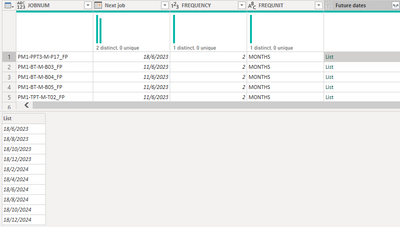
I have a working custom column that provides me the list of dates. 
But my jobs have varying frequencies of 2-12 months intervals. 


List.Generate(() => [Next job],
each Date.From(_) <= Date.From(Date.AddYears(Date.EndOfYear(DateTime.LocalNow()), 1)),
each Date.AddMonths(_, 2))

bent_2-1682408783789.png


Once I change my code to :

List.Generate(() => [Next job],
each Date.From(_) <= Date.From(Date.AddYears(Date.EndOfYear(DateTime.LocalNow()), 1)),
each Date.AddMonths( _ , [FREQUENCY]))


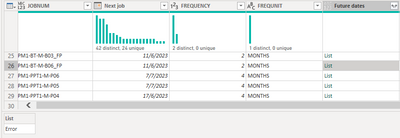
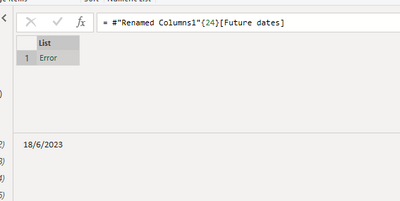
I get an error and when expanding further, it just shows me a date without any error message. 

bent_3-1682408917618.png

bent_4-1682408941105.png

Anyone knows what is causing this issue, and how I can work around it ?

Thanks

1 ACCEPTED SOLUTION
HotChilli
Community Champion
Community Champion

It might be a field access error.

Try

let freq = [FREQUENCY] in each Date.AddMonths( _ , freq))


View solution in original post

6 REPLIES 6
HotChilli
Community Champion
Community Champion

It might be a field access error.

Try

let freq = [FREQUENCY] in each Date.AddMonths( _ , freq))


It generates without issue once i added in this line
Thanks! 

Hi ben-t,


Could you share the full code that worked for you?

I think I've tried every possible code with the above solution, but I still get an error.


Thanks!

Hi @GekkeHellie

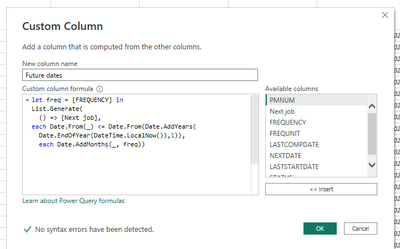
this is the code i used

let freq = [FREQUENCY] in
List.Generate(
() => [Next job],
each Date.From(_) <= Date.From(Date.AddYears(Date.EndOfYear(DateTime.LocalNow()),1)),
each Date.AddMonths(_, freq))

bent_2-1689043260344.png


Hi @ben-t ,


Your answer definitely helped me into the right direction.

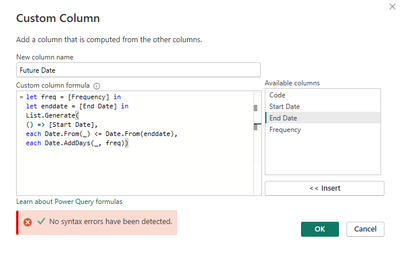
In the table there is a start date, end date and frequency and I also wanted to create a new row between the two dates based on de frequency.


My table looks like this:

GekkeHellie_0-1689064607678.png


But since I have a end date in a column, instead of a formula like yours, I still got a error.

So I also added the below line to the code:

let enddate = [End Date]

GekkeHellie_1-1689064855680.png

let freq = [Frequency] in
let enddate = [End Date] in
List.Generate(
() => [Start Date],
each Date.From(_) <= Date.From(enddate),
each Date.AddDays(_, freq))


Thanks for helping me out!


m_dekorte
Resident Rockstar
Resident Rockstar

Hi @ben-t 

Its an invironment/ item access issue, here's a work around. Just assign the field value to a variable and bring that into your calculation.


let n = [FREQUENCY] in List.Generate(() => [Next job],
each Date.From(_) <= Date.From(Date.AddYears(Date.EndOfYear(DateTime.LocalNow()), 1)),
each Date.AddMonths(_, n ))


Ps. If this helps solve your query please mark this post as Solution, thanks!

Helpful resources

Announcements
Power BI DataViz World Championships

Power BI Dataviz World Championships

The Power BI Data Visualization World Championships is back! Get ahead of the game and start preparing now!

December 2025 Power BI Update Carousel

Power BI Monthly Update - December 2025

Check out the December 2025 Power BI Holiday Recap!

FabCon Atlanta 2026 carousel

FabCon Atlanta 2026

Join us at FabCon Atlanta, March 16-20, for the ultimate Fabric, Power BI, AI and SQL community-led event. Save $200 with code FABCOMM.

Top Solution Authors