FabCon is coming to Atlanta
Join us at FabCon Atlanta from March 16 - 20, 2026, for the ultimate Fabric, Power BI, AI and SQL community-led event. Save $200 with code FABCOMM.
Register now!- Power BI forums
- Get Help with Power BI
- Desktop
- Service
- Report Server
- Power Query
- Mobile Apps
- Developer
- DAX Commands and Tips
- Custom Visuals Development Discussion
- Health and Life Sciences
- Power BI Spanish forums
- Translated Spanish Desktop
- Training and Consulting
- Instructor Led Training
- Dashboard in a Day for Women, by Women
- Galleries
- Data Stories Gallery
- Themes Gallery
- Contests Gallery
- QuickViz Gallery
- Quick Measures Gallery
- Visual Calculations Gallery
- Notebook Gallery
- Translytical Task Flow Gallery
- TMDL Gallery
- R Script Showcase
- Webinars and Video Gallery
- Ideas
- Custom Visuals Ideas (read-only)
- Issues
- Issues
- Events
- Upcoming Events
The Power BI Data Visualization World Championships is back! Get ahead of the game and start preparing now! Learn more
- Power BI forums
- Forums
- Get Help with Power BI
- Power Query
- Hello everyone, I need a help regarding Query lang...
- Subscribe to RSS Feed
- Mark Topic as New
- Mark Topic as Read
- Float this Topic for Current User
- Bookmark
- Subscribe
- Printer Friendly Page

- Mark as New
- Bookmark
- Subscribe
- Mute
- Subscribe to RSS Feed
- Permalink
- Report Inappropriate Content
Hello everyone, I need a help regarding Query language in Power Bi
I had an Open order sales column, Source column, Document date column and Document_due date column in my table(Source column and Document date column append from the other table)
"This was my Formula for Open Order Sale Column"
Open Order Sales = if [Source] = "Actuals" and [ObjType] = "17" and [LineStatus] = "O" then [LineTotal] else 0
The problem was - The Open order sales column is generating values based on Document date(But we need the open order sales to generate regarding Document_due date)
Is there any Function in the query language to tell the open order sales column to take the given column dates?
Thanks to everyone for participating, and I appreciate any help you guys can provide.
Solved! Go to Solution.
- Mark as New
- Bookmark
- Subscribe
- Mute
- Subscribe to RSS Feed
- Permalink
- Report Inappropriate Content
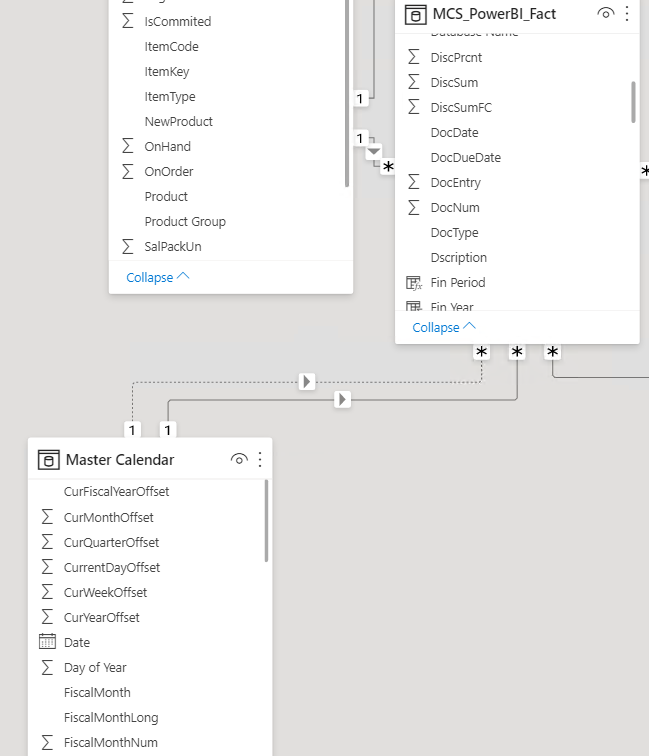
I assume you are just adding the [DocDueDate] and the [Open order sales] fields to a visual and they are not working as expected. This makes perfect sense since the relationship between these 2 columns is not active. To make it work, you should keep the relationships as is but use a measure for the calculation. Assuming you need to calculate the sum of the [Open order sales], you can create and then use the below measure in your visuals:
[SumOpenOrderSales] = CALCULATE(SUM([Open order sales]),USERELATIONSHIP('MCS_POWERBI_FACT'[DocDueDate],'Master Calendar'[Date]))

- Mark as New
- Bookmark
- Subscribe
- Mute
- Subscribe to RSS Feed
- Permalink
- Report Inappropriate Content
I guess you don't need to append. If you just create a relationship between the Document_due date(Table1) and the Document date(Table2), you should able to use the Document date to filter the measure. The relationship will be CalendarTable <=> Table1 <=>Table2
For relationship problems, it can be complicated since we don't have your full model. If possible, you can create a sample pbix with only tables and some relevant columns and removing sensitive data.
Best Regards
Paul Zheng _ Community Support Team
- Mark as New
- Bookmark
- Subscribe
- Mute
- Subscribe to RSS Feed
- Permalink
- Report Inappropriate Content
I tried the way as you said- But really, it doesn't affect anything(Same as before)
- Mark as New
- Bookmark
- Subscribe
- Mute
- Subscribe to RSS Feed
- Permalink
- Report Inappropriate Content
Hi gdarakji,
Thanks for looking into the issue - Open Order Sales was a measure.
- Mark as New
- Bookmark
- Subscribe
- Mute
- Subscribe to RSS Feed
- Permalink
- Report Inappropriate Content
Do you have any date dimension tables related to your fact table? If so, then you need to relate the date table to the Document_due date and use the USERELATIONSHIP function to perform the calculation. If not, then could it be that you are adding the Document date instead of the Document_Due date to the visual?
- Mark as New
- Bookmark
- Subscribe
- Mute
- Subscribe to RSS Feed
- Permalink
- Report Inappropriate Content
Yeah, I had a Date table that was Currently related to the Document date.
And, If I make the relationship inactive and If I make the relation active between Document Due Date and Date table then the Budget and Sales are not working (Open Order sales are working great).
- Mark as New
- Bookmark
- Subscribe
- Mute
- Subscribe to RSS Feed
- Permalink
- Report Inappropriate Content
I assume you are just adding the [DocDueDate] and the [Open order sales] fields to a visual and they are not working as expected. This makes perfect sense since the relationship between these 2 columns is not active. To make it work, you should keep the relationships as is but use a measure for the calculation. Assuming you need to calculate the sum of the [Open order sales], you can create and then use the below measure in your visuals:
[SumOpenOrderSales] = CALCULATE(SUM([Open order sales]),USERELATIONSHIP('MCS_POWERBI_FACT'[DocDueDate],'Master Calendar'[Date]))
- Mark as New
- Bookmark
- Subscribe
- Mute
- Subscribe to RSS Feed
- Permalink
- Report Inappropriate Content
Yoo, That was right! - Thank you gdarakji.
Really appreciated.
- Mark as New
- Bookmark
- Subscribe
- Mute
- Subscribe to RSS Feed
- Permalink
- Report Inappropriate Content
We need more details to be able to assist. Is the [Open Order Sales] field a column in a table or a measure? If it is a column, then please clarify how is it possible for the any date column to impact its value since neither [document date] nor [document_due date] are part of the equation.
Helpful resources

Power BI Dataviz World Championships
The Power BI Data Visualization World Championships is back! Get ahead of the game and start preparing now!

Power BI Monthly Update - December 2025
Check out the December 2025 Power BI Holiday Recap!

FabCon Atlanta 2026
Join us at FabCon Atlanta, March 16-20, for the ultimate Fabric, Power BI, AI and SQL community-led event. Save $200 with code FABCOMM.


| User | Count |
|---|---|
| 19 | |
| 9 | |
| 8 | |
| 7 | |
| 6 |


