Join us at FabCon Atlanta from March 16 - 20, 2026, for the ultimate Fabric, Power BI, AI and SQL community-led event. Save $200 with code FABCOMM.
Register now!Vote for your favorite vizzies from the Power BI Dataviz World Championship submissions. Vote now!
Hello all,
I think this is a basic grouping action however I can't get it to work. Or I may need to pivot or have a conditional statement in, but was hoping someone would be able to assist.
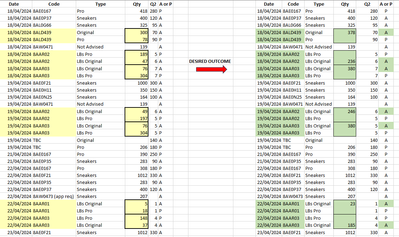
I have a data set of sales where, if there are multiple rows for a single day and code, I want to SUM the Qty column relating to the Date and the Code and for the summed value to populate in the corresponding row that has A in column A or P. And to leave the corresponding Qty cell (where column [A or P] is P) blank. The order of [A and P] is not always A on top so may need sorting? But don't want to mess up the data. Example of desired outcome below, and data table provided.
Solved! Go to Solution.
hello, @JNelson group and expand operations may shuffle data so add index column to sort by in the end if you like.
let
Source = your_table,
fx = (tbl) =>
if Table.RowCount(tbl) = 1
then tbl
else Table.FromRecords(
Table.TransformRows(
tbl,
(x) => Record.TransformFields(
x,
{"Qty", each if x[A or P] = "A" then List.Sum(tbl[Qty]) else null}
)
)
),
group = Table.Group(
Source,
{"Date", "Code"},
{{"x", fx}}),
xp_tbl = Table.ExpandTableColumn(group, "x", {"Type", "Qty", "Q2", "A or P"})
in
xp_tbl
Hi @JNelson, different approach here.
Before

After

let
Source = Table.FromRows(Json.Document(Binary.Decompress(Binary.FromText("i45WMrTQNzDRNzIwMlHSUTIEYv+izPTMvMQcINPYwABImoMIR6VYHSyKA4ryQSosgIQlSFkApjIjIPZxKlaAKDW0sASSpviVIjnBxBxImEEcEAsA", BinaryEncoding.Base64), Compression.Deflate)), let _t = ((type nullable text) meta [Serialized.Text = true]) in type table [Date = _t, Code = _t, Type = _t, Qty = _t, Q2 = _t, #"A or P" = _t]),
ChangedType = Table.TransformColumnTypes(Source,{{"Qty", Int64.Type}, {"Q2", Int64.Type}, {"Date", type date}}),
GroupedRows = Table.Group(ChangedType, {"Date", "Code"}, {{"All", each Table.AddColumn(_, "Sum Qty", (x)=> List.Sum([Qty]), Int64.Type), type table [Date=nullable date, Code=nullable text, Type=nullable text, Qty=nullable number, Q2=nullable number, A or P=nullable text]}}),
CombinedAll = Table.Combine(GroupedRows[All]),
ReplacedQty = Table.ReplaceValue(CombinedAll,
each [A or P] = "A",
each [Sum Qty],
(x,y,z)=> if y then z else null,
{"Qty"} ),
RestoreDataTypes = Value.ReplaceType(ReplacedQty, Value.Type(CombinedAll)),
RemovedColumns = Table.RemoveColumns(RestoreDataTypes,{"Sum Qty"})
in
RemovedColumns
hello, @JNelson group and expand operations may shuffle data so add index column to sort by in the end if you like.
let
Source = your_table,
fx = (tbl) =>
if Table.RowCount(tbl) = 1
then tbl
else Table.FromRecords(
Table.TransformRows(
tbl,
(x) => Record.TransformFields(
x,
{"Qty", each if x[A or P] = "A" then List.Sum(tbl[Qty]) else null}
)
)
),
group = Table.Group(
Source,
{"Date", "Code"},
{{"x", fx}}),
xp_tbl = Table.ExpandTableColumn(group, "x", {"Type", "Qty", "Q2", "A or P"})
in
xp_tbl
NewStep=let a=Table.Group(PreivousStepName,{"Date","Code"},{"n",each if Table.RowCount(_)>1 then List.Sum([Qty]) else null}) in Table.ReplaceValue(PreviousStepName,each _,"",(x,y,z)=>let b= a{[Date=y[Date],Code=y[Code]]}[n] in if b=null then x else if y[A or P]="A" then b else null,{"Qty"})
The Power BI Data Visualization World Championships is back! It's time to submit your entry.
If you love stickers, then you will definitely want to check out our Community Sticker Challenge!
Check out the January 2026 Power BI update to learn about new features.
| User | Count |
|---|---|
| 5 | |
| 5 | |
| 4 | |
| 3 | |
| 3 |