Hi
Im struggling using the table.max as its returning; Expression.Error: The specified sort criteria is invalid.
Details:
let
Source = Folder.Files("XX"),
#"Filtered Hidden Files1" = Table.SelectRows(Source, each [Attributes]?[Hidden]? <> true),
#"Invoke Custom Function1" = Table.AddColumn(#"Filtered Hidden Files1", "Transform File", each #"Transform File"([Content])),
#"Renamed Columns1" = Table.RenameColumns(#"Invoke Custom Function1", {"Name", "Source.Name"}),
#"Removed Other Columns1" = Table.SelectColumns(#"Renamed Columns1", {"Source.Name", "Transform File"}),
#"Expanded Table Column1" = Table.ExpandTableColumn(#"Removed Other Columns1", "Transform File", Table.ColumnNames(#"Transform File"(#"Sample File"))),
#"Changed Type" = Table.TransformColumnTypes(#"Expanded Table Column1",{{"Source.Name", type text}, {"id", Int64.Type}, {"naam", type text}, {"achternaam", type text}, {"status", type text}}),
#"Grouped Rows" = Table.Group(#"Changed Type", {"id"}, {{"MaxSource", each List.Max([Source.Name]), type nullable text}, {"Detail", each _, type table [Source.Name=nullable text, id=nullable number, naam=nullable text, achternaam=nullable text, status=nullable text]}}),
#"Added Custom" = Table.AddColumn(#"Grouped Rows", "Custom", each Table.Max([Detail],"MaxSource"))
in
#"Added Custom"
Ive added a screenshot
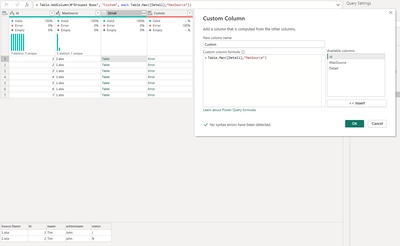
Column Custom would return rows where MaxSource=Source.Name.
Thanks in advance


