cancel
Showing results for 
Search instead for 
Did you mean: 

July 7 - July 17 | Round 2 of the Power BI Dataviz World Championships. Don't miss your chance! Learn more

Reply
PQ-Noob675137
Frequent Visitor

Grouped by Max Source.Name, table.max returns error

Hi

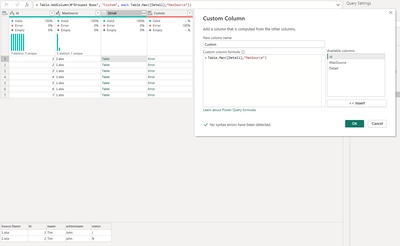
Im struggling using the table.max as its returning; Expression.Error: The specified sort criteria is invalid.
Details:

let
Source = Folder.Files("XX"),
#"Filtered Hidden Files1" = Table.SelectRows(Source, each [Attributes]?[Hidden]? <> true),
#"Invoke Custom Function1" = Table.AddColumn(#"Filtered Hidden Files1", "Transform File", each #"Transform File"([Content])),
#"Renamed Columns1" = Table.RenameColumns(#"Invoke Custom Function1", {"Name", "Source.Name"}),
#"Removed Other Columns1" = Table.SelectColumns(#"Renamed Columns1", {"Source.Name", "Transform File"}),
#"Expanded Table Column1" = Table.ExpandTableColumn(#"Removed Other Columns1", "Transform File", Table.ColumnNames(#"Transform File"(#"Sample File"))),
#"Changed Type" = Table.TransformColumnTypes(#"Expanded Table Column1",{{"Source.Name", type text}, {"id", Int64.Type}, {"naam", type text}, {"achternaam", type text}, {"status", type text}}),
#"Grouped Rows" = Table.Group(#"Changed Type", {"id"}, {{"MaxSource", each List.Max([Source.Name]), type nullable text}, {"Detail", each _, type table [Source.Name=nullable text, id=nullable number, naam=nullable text, achternaam=nullable text, status=nullable text]}}),
#"Added Custom" = Table.AddColumn(#"Grouped Rows", "Custom", each Table.Max([Detail],"MaxSource"))
in
#"Added Custom"


Ive added a screenshot
PQimage.png

Column Custom would return rows where MaxSource=Source.Name.


Thanks in advance


1 ACCEPTED SOLUTION
lbendlin
Super User
Super User

each Table.Max([Detail],"Source.Name")

View solution in original post

3 REPLIES 3
lbendlin
Super User
Super User

each Table.Max([Detail],"Source.Name")

Hi thanks for the reply. It worked!


I am running into a somewhat different problem. I have tried this with a small batch of data. Ive just tried the same steps above but with 5 CSV files (+- 1GB) and it seems Power Query is not responding anymore.

Is there a more efficient way of doing this?
The objective is to retrieve the max value of Source.Name for each ID and their row information. 

Thanks in advance


Hi @PQ-Noob675137, you should mark Ibendlin's post as a solution and create new topic.


Note: Check this link to learn how to use my query.
Check this link if you don't know how to provide sample data.

Helpful resources

Announcements
FabCon and SQLCon Barcelona 2026

FabCon & SQLCon – Barcelona 2026

Join us in Barcelona for FabCon and SQLCon, the Fabric, Power BI, SQL, and AI community event. Save €200 with code FABCMTY200.

60 days of Data Days Carousel

Data Days 2026

Join Data Days 2026: 60 days of free live/on-demand sessions, challenges, study groups, and certification opportunities.

Power BI DataViz World Championships carousel

Power BI DataViz World Championships - June 2026

A new Power BI DataViz World Championship is coming this June! Don't miss out on submitting your entry.