Join us at FabCon Atlanta from March 16 - 20, 2026, for the ultimate Fabric, Power BI, AI and SQL community-led event. Save $200 with code FABCOMM.
Register now!The Power BI Data Visualization World Championships is back! Get ahead of the game and start preparing now! Learn more
Hi All, I have the following Power Query setup:
let
Source = #"!Active-MC",
#"Reordered Columns" = Table.ReorderColumns(Source,{"account_id", "Name (link)", "Member #", "Email", "T", "ProfileLink", "Position Name.1", "Position Name.2", "Start Date", "First Name", "Preferred Name", "Last Name", "account_id text", "MC Pos"}),
#"Removed Other Columns" = Table.SelectColumns(#"Reordered Columns",{"account_id", "Name (link)", "Member #", "Email", "T", "ProfileLink"}),
#"Sorted Rows" = Table.Sort(#"Removed Other Columns",{{"Member #", Order.Ascending}}),
#"Buffer Table" = Table.Buffer(#"Sorted Rows"),
#"Grouped Rows" = Table.Group(#"Buffer Table", {"Member #"}, {{"T", each Text.Combine([T],"
"), type nullable text}})
in
#"Grouped Rows"
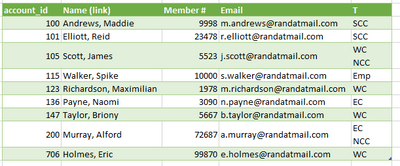
Here is an Excel document with the data before, data after the query, and then what I want.
Is there any way to accomplish the last tab so it groups the rows based on Member # and the T field, but keeps some of the additional columns?
Thanks
Solved! Go to Solution.
Just Group by all those other columns.
eg:
#"Grouped Rows" = Table.Group(#"Previous Step", {"account_id", "Name (link)", "Member #", "Email"}, {
{"T", each Text.Combine([T], "#(lf)"), type text}})
in
#"Grouped Rows"
Just Group by all those other columns.
eg:
#"Grouped Rows" = Table.Group(#"Previous Step", {"account_id", "Name (link)", "Member #", "Email"}, {
{"T", each Text.Combine([T], "#(lf)"), type text}})
in
#"Grouped Rows"
The Power BI Data Visualization World Championships is back! Get ahead of the game and start preparing now!
| User | Count |
|---|---|
| 19 | |
| 10 | |
| 9 | |
| 7 | |
| 6 |