cancel
Showing results for 
Search instead for 
Did you mean: 

Next up in the FabCon + SQLCon recap series: The roadmap for Microsoft SQL and Maximizing Developer experiences in Fabric. All sessions are available on-demand after the live show. Register now

Reply
jamiers
Helper I
Helper I

Grouped Rows with Extra Columns

Hi All,  I have the following Power Query setup:

let
    Source = #"!Active-MC",
    #"Reordered Columns" = Table.ReorderColumns(Source,{"account_id", "Name (link)", "Member #", "Email", "T", "ProfileLink", "Position Name.1", "Position Name.2", "Start Date", "First Name", "Preferred Name", "Last Name", "account_id text", "MC Pos"}),
    #"Removed Other Columns" = Table.SelectColumns(#"Reordered Columns",{"account_id", "Name (link)", "Member #", "Email", "T", "ProfileLink"}),
    #"Sorted Rows" = Table.Sort(#"Removed Other Columns",{{"Member #", Order.Ascending}}),
    #"Buffer Table" = Table.Buffer(#"Sorted Rows"),
    #"Grouped Rows" = Table.Group(#"Buffer Table", {"Member #"}, {{"T", each Text.Combine([T],"
"), type nullable text}})  
in
    #"Grouped Rows"


Here is an Excel document with the data before, data after the query, and then what I want.

Grouped Rows Question.xlsx


Is there any way to accomplish the last tab so it groups the rows based on Member # and the T field, but keeps some of the additional columns?


Thanks

1 ACCEPTED SOLUTION
ronrsnfld
Super User
Super User

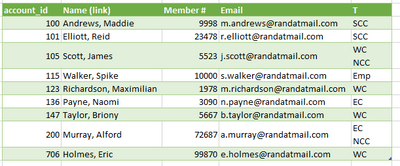
Just Group by all those other columns.

eg:

   #"Grouped Rows" = Table.Group(#"Previous Step", {"account_id", "Name (link)", "Member #", "Email"}, {
        {"T", each Text.Combine([T], "#(lf)"), type text}}) 
in
    #"Grouped Rows"

ronrsnfld_0-1660441590076.png


View solution in original post

1 REPLY 1
ronrsnfld
Super User
Super User

Just Group by all those other columns.

eg:

   #"Grouped Rows" = Table.Group(#"Previous Step", {"account_id", "Name (link)", "Member #", "Email"}, {
        {"T", each Text.Combine([T], "#(lf)"), type text}}) 
in
    #"Grouped Rows"

ronrsnfld_0-1660441590076.png


Helpful resources

Announcements
New to Fabric survey Carousel

New to Fabric Survey

If you have recently started exploring Fabric, we'd love to hear how it's going. Your feedback can help with product improvements.

Power BI DataViz World Championships carousel

Power BI DataViz World Championships - June 2026

A new Power BI DataViz World Championship is coming this June! Don't miss out on submitting your entry.

March Power BI Update Carousel

Power BI Community Update - March 2026

Check out the March 2026 Power BI update to learn about new features.