Learn from the best! Meet the four finalists headed to the FINALS of the Power BI Dataviz World Championships! Register now
Hi All, I have the following Power Query setup:
let
Source = #"!Active-MC",
#"Reordered Columns" = Table.ReorderColumns(Source,{"account_id", "Name (link)", "Member #", "Email", "T", "ProfileLink", "Position Name.1", "Position Name.2", "Start Date", "First Name", "Preferred Name", "Last Name", "account_id text", "MC Pos"}),
#"Removed Other Columns" = Table.SelectColumns(#"Reordered Columns",{"account_id", "Name (link)", "Member #", "Email", "T", "ProfileLink"}),
#"Sorted Rows" = Table.Sort(#"Removed Other Columns",{{"Member #", Order.Ascending}}),
#"Buffer Table" = Table.Buffer(#"Sorted Rows"),
#"Grouped Rows" = Table.Group(#"Buffer Table", {"Member #"}, {{"T", each Text.Combine([T],"
"), type nullable text}})
in
#"Grouped Rows"
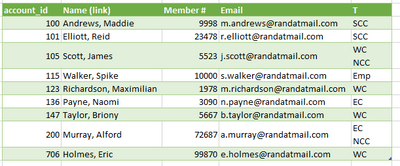
Here is an Excel document with the data before, data after the query, and then what I want.
Is there any way to accomplish the last tab so it groups the rows based on Member # and the T field, but keeps some of the additional columns?
Thanks
Solved! Go to Solution.
Just Group by all those other columns.
eg:
#"Grouped Rows" = Table.Group(#"Previous Step", {"account_id", "Name (link)", "Member #", "Email"}, {
{"T", each Text.Combine([T], "#(lf)"), type text}})
in
#"Grouped Rows"
Just Group by all those other columns.
eg:
#"Grouped Rows" = Table.Group(#"Previous Step", {"account_id", "Name (link)", "Member #", "Email"}, {
{"T", each Text.Combine([T], "#(lf)"), type text}})
in
#"Grouped Rows"
A new Power BI DataViz World Championship is coming this June! Don't miss out on submitting your entry.
Share feedback directly with Fabric product managers, participate in targeted research studies and influence the Fabric roadmap.
| User | Count |
|---|---|
| 5 | |
| 4 | |
| 4 | |
| 3 | |
| 2 |
| User | Count |
|---|---|
| 11 | |
| 10 | |
| 8 | |
| 7 | |
| 6 |