Join us in Barcelona for FabCon and SQLCon, September 28 - October 1, 2026.
This is best Fabric, Power BI, SQL and AI community event. How do we know? The last event sold out! Save €200 with code FABCMTY200.
Register now- Power BI forums
- Get Help with Power BI
- Desktop
- Service
- Report Server
- Power Query
- Mobile Apps
- Developer
- DAX Commands and Tips
- Custom Visuals Development Discussion
- Health and Life Sciences
- Power BI Spanish forums
- Translated Spanish Desktop
- Training and Consulting
- Instructor Led Training
- Dashboard in a Day for Women, by Women
- Galleries
- Data Stories Gallery
- Themes Gallery
- Contests Gallery
- QuickViz Gallery
- Quick Measures Gallery
- Visual Calculations Gallery
- Fabric Apps Gallery
- Notebook Gallery
- Translytical Task Flow Gallery
- TMDL Gallery
- R Script Showcase
- Webinars and Video Gallery
- Ideas
- Custom Visuals Ideas (read-only)
- Issues
- Issues
- Events
- Upcoming Events
The Fabric community is upgrading! Read all of the details including the timeline and what you can expect. Learn more
- Power BI forums
- Forums
- Get Help with Power BI
- Power Query
- Group columns on pivot table
- Subscribe to RSS Feed
- Mark Topic as New
- Mark Topic as Read
- Float this Topic for Current User
- Bookmark
- Subscribe
- Printer Friendly Page

- Mark as New
- Bookmark
- Subscribe
- Mute
- Subscribe to RSS Feed
- Permalink
- Report Inappropriate Content
Group columns on pivot table
Hello to every one,
I've been trying to group certain columns depending on a value.
I have this table:
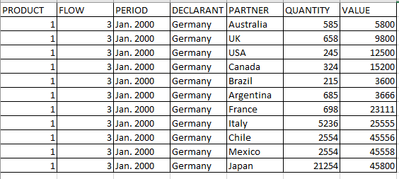
| PRODUCT | FLOW | PERIOD | DECLARANT | PARTNER | QUANTITY | VALUE |
| 1 | 3 | Jan. 2000 | Germany | Australia | 585 | 5800 |
| 1 | 3 | Jan. 2000 | Germany | UK | 658 | 9800 |
| 1 | 3 | Jan. 2000 | Germany | USA | 245 | 12500 |
| 1 | 3 | Jan. 2000 | Germany | Canada | 324 | 15200 |
| 1 | 3 | Jan. 2000 | Germany | Brazil | 215 | 3600 |
| 1 | 3 | Jan. 2000 | Germany | Argentina | 685 | 3666 |
| 1 | 3 | Jan. 2000 | Germany | France | 698 | 23111 |
| 1 | 3 | Jan. 2000 | Germany | Italy | 5236 | 25555 |
| 1 | 3 | Jan. 2000 | Germany | Chile | 2554 | 45556 |
| 1 | 3 | Jan. 2000 | Germany | Mexico | 2554 | 45558 |
| 1 | 3 | Jan. 2000 | Germany | Japan | 21254 | 45800 |
I've created a pivot table, all partners/countries are shown, but I want to group certain countries into a "column" inside the pivot table as "others".
This is what I'm trying to get:

| PARTNER | AUSTRALIA | BRAZIL | USA | CANADA | OTHERS | |||||
| PERIOD | QTY | VALUE | QTY | VALUE | QTY | VALUE | QTY | VALUE | QTY | VALUE |
| Jan. 2000 | 585 | 5800 | 215 | 3600 | 245 | 12500 | 324 | 15200 |
The column other should be the sum of the countries which are not shown, those countries will be always the same ones, does not depend on a certain value of qty or value.
Many thanks in advance!
Solved! Go to Solution.


- Mark as New
- Bookmark
- Subscribe
- Mute
- Subscribe to RSS Feed
- Permalink
- Report Inappropriate Content
Hi @ciervax
I tried @JW_van_Holst 's solution and create a pivot table like below. The output is the same as your expected result. Is this what you want?

Regards,
Community Support Team _ Jing
If this post helps, please Accept it as the solution to help other members find it.


- Mark as New
- Bookmark
- Subscribe
- Mute
- Subscribe to RSS Feed
- Permalink
- Report Inappropriate Content
In power query add an column:
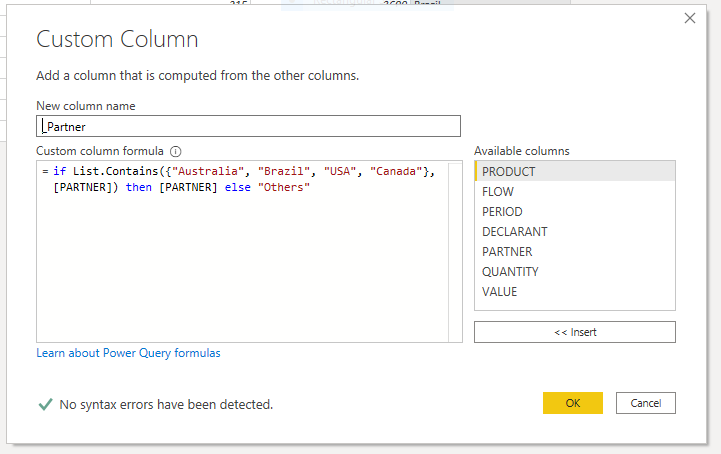
In your pivot table select _Partner in stead of Partner and it should do the job.
Good luck,
//JW
- Mark as New
- Bookmark
- Subscribe
- Mute
- Subscribe to RSS Feed
- Permalink
- Report Inappropriate Content
Thank you for your help.
The problem I see, is the new column _Partner is marking all fields as others, even if the country in partner is not listed as "Australia", "etc"
Then if I select _Partner as a column instead of Partner, is showing only the column Others cause the column is containing all countries.
I don't know why it is not reading the list properly, and all rows are "Others".
- Mark as New
- Bookmark
- Subscribe
- Mute
- Subscribe to RSS Feed
- Permalink
- Report Inappropriate Content
Hi @ciervax
I tried @JW_van_Holst 's solution and create a pivot table like below. The output is the same as your expected result. Is this what you want?
Regards,
Community Support Team _ Jing
If this post helps, please Accept it as the solution to help other members find it.

- Mark as New
- Bookmark
- Subscribe
- Mute
- Subscribe to RSS Feed
- Permalink
- Report Inappropriate Content
if you upload a copiable table, could, perhaps, get you a quicker response.
- Mark as New
- Bookmark
- Subscribe
- Mute
- Subscribe to RSS Feed
- Permalink
- Report Inappropriate Content
Sure, I've edited the post, I tried the first time to do it, but the second table was not showing properly, cause some fields are combined, I don't know if there is any other option.
- Mark as New
- Bookmark
- Subscribe
- Mute
- Subscribe to RSS Feed
- Permalink
- Report Inappropriate Content
Helpful resources

FabCon & SQLCon – Barcelona 2026
Join us in Barcelona for FabCon and SQLCon, the Fabric, Power BI, SQL, and AI community event. Save €200 with code FABCMTY200.

Power BI DataViz World Championships - June 2026
A new Power BI DataViz World Championship is coming this June! Don't miss out on submitting your entry.


